


 Fleet Management
 Route optimization
 Shuttle Transportation
 Delivery Management
 School Bus Transportation
 Ride Sharing Management
 Airport Transfer Booking
  Vehicle inspection
 Car Rental Management
 Trucking & Logistics
 Food & Beverage
 E-Commerce
 Passenger Transit
 Delivery
 School & Corporate
Why You Need An Automated Taxi Driver Payment Software For Your Taxi Booking App
Taxi driver payment software calculates and records the money moving between a taxi operator and its drivers — applying commissions, incentives, fees and deductions, reconciling cash and online payments, updating driver wallets, generating settlement statements, and determining whether a payment is due to the driver (a payout) or to the operator (a pay-in). Completing the trip is only half the job; settling it accurately, transparently and at scale is the other half, and it’s where manual spreadsheets break down first.
Key Takeaways
- Driver settlement software manages financial transactions between drivers and taxi operators.
- It is different from passenger billing, conventional payroll and basic payment processing.
- A settlement can result in a pay-in from the driver or a payout to the driver.
- Prepaid and postpaid driver wallets support different commission-collection models.
- A suitable system should reconcile cash and digital trips, incentives, deductions and manual adjustments.
- Automation reduces repetitive finance work, but approval controls and exception handling remain important.
Quick answer: what is taxi driver payment software?
Taxi driver payment software calculates and records the money moving between a taxi operator and its drivers. It can apply commissions, incentives, fees and deductions; reconcile cash and online payments; update driver wallets; generate settlement statements; and determine whether a payment is due to the driver or the operator.
The billing workflow separates this process into two important areas — the driver wallet and driver settlement — including prepaid and postpaid wallet models and pay-in or payout calculations.
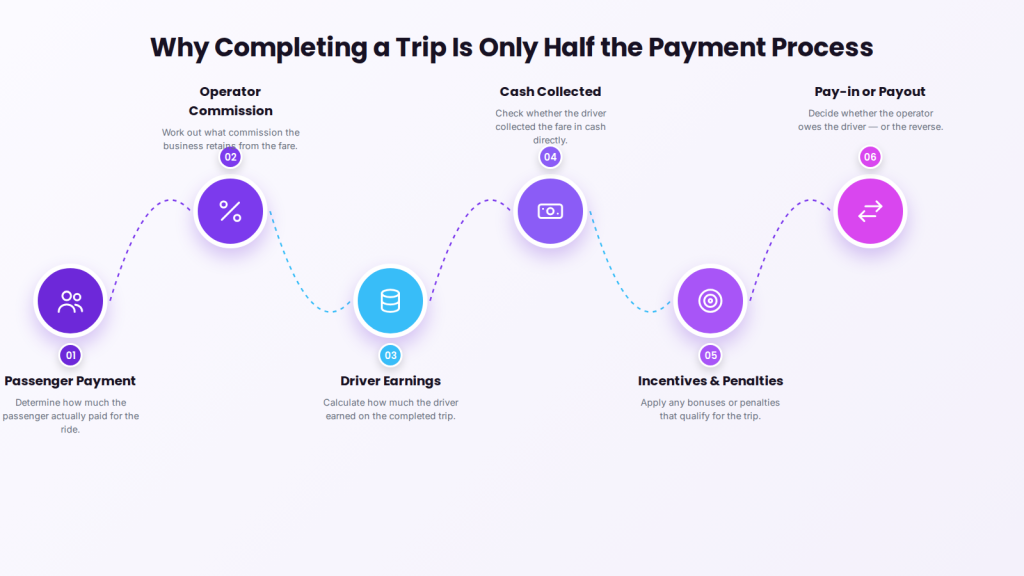
Why completing a trip is only half the payment process
After each ride, the operator still needs to determine how much the passenger paid, what commission the business retains, how much the driver earned, whether the driver collected cash, which incentives or penalties apply, and ultimately whether the operator owes the driver or the driver owes the operator.
Managing these calculations by hand can work for a very small fleet. As bookings, drivers, payment methods and commission plans multiply, spreadsheets and handwritten records quickly become difficult to reconcile. A taxi driver payment and settlement system brings these financial activities into one connected workflow: it records trip earnings, applies commission rules, updates driver balances and produces clear settlement statements for drivers and administrators.
What is the difference between driver billing, passenger billing and payroll?
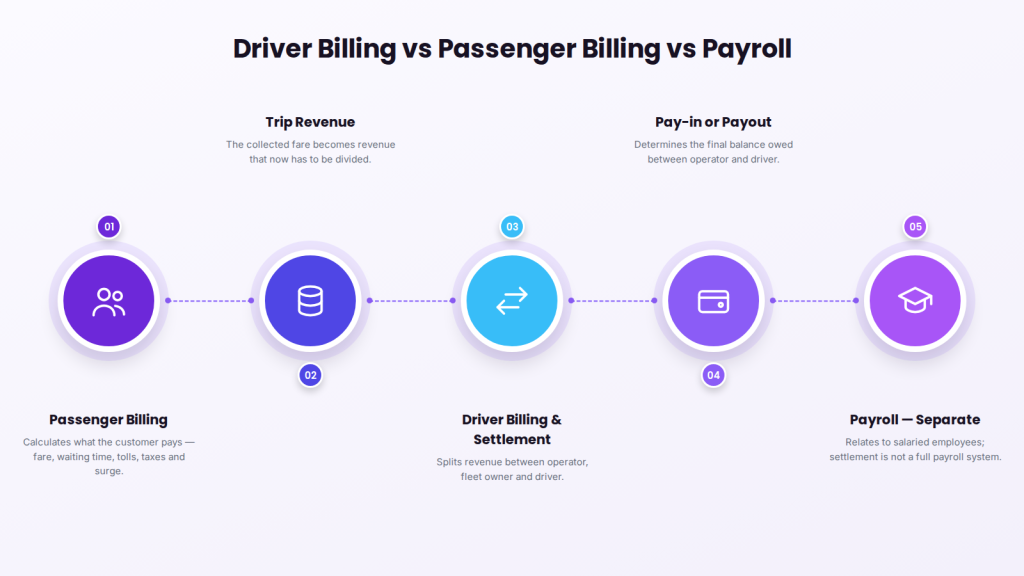
These three terms describe different processes: passenger billing determines what the customer pays, driver billing and settlement determines how that revenue is split between operator and driver, and payroll relates to employees on salaries or wages. Confusing them is a common source of buying mistakes.
Passenger billing
Passenger billing calculates the amount charged to the customer, based on trip distance, duration, base fare, waiting time, tolls, taxes, add-ons, discounts, and surge or zone pricing. Its purpose is to determine what the passenger must pay.
Driver billing and settlement
Driver billing determines how trip revenue is divided between the driver, fleet owner and platform operator. It may include operator commission, driver earnings, cash retained by the driver, incentives, subscription fees, penalties, reimbursements, taxes, and approved financial adjustments. Its purpose is to determine the final balance between the operator and the driver.
Payroll
Payroll generally relates to employees receiving salaries or wages. Many taxi drivers instead work through commission, contractor, vehicle-owner, revenue-share or subscription arrangements. For this reason, driver settlement software should not automatically be treated as a complete payroll system — employment classification, tax reporting and legal obligations depend on the operating model and jurisdiction.
Why does manual driver settlement become difficult?
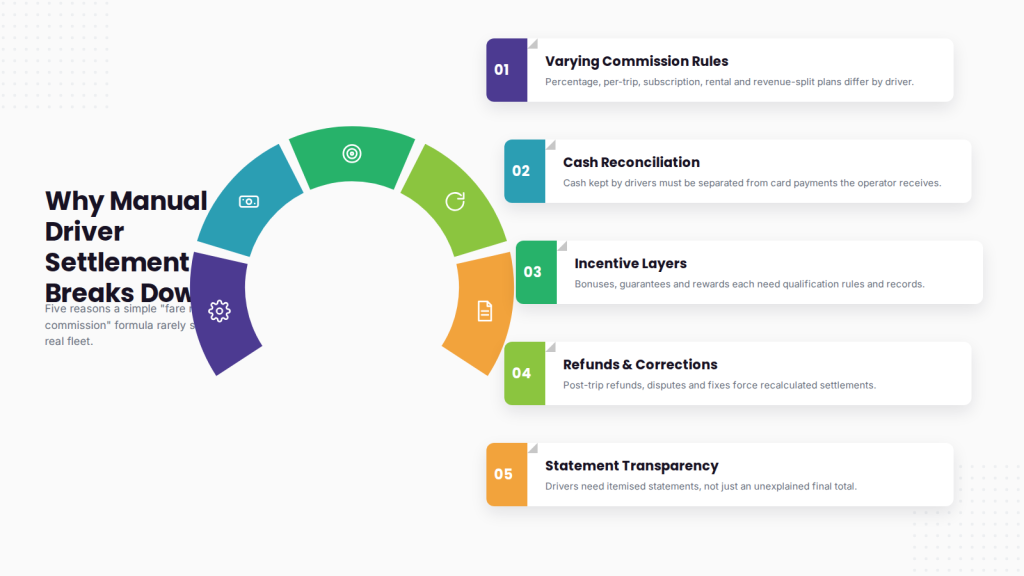
A simple “fare minus commission equals earnings” formula rarely survives contact with a real fleet, because commission rules vary by driver, cash rides must be reconciled separately, incentives and refunds add layers, and drivers need itemised statements. Each of these turns a one-line calculation into a reconciliation problem.
Different drivers may have different commission rules
One driver may pay a percentage of each trip, while another uses a fixed per-trip fee, a daily subscription, a weekly rental charge, a vehicle-owner revenue split, or a custom corporate arrangement. Calculating these manually increases the chance of inconsistent deductions.
Cash rides must be reconciled separately
When a passenger pays by card, the payment may initially reach the operator. When a passenger pays in cash, the driver may retain the money directly. The settlement system must recognise this difference — otherwise the driver may be paid twice, or the operator may fail to collect the commission it is owed.
Incentives add another calculation layer
Operators may offer trip-completion bonuses, peak-hour incentives, referral rewards, attendance bonuses, minimum-earning guarantees, performance incentives, or location-specific rewards. Each needs clear qualification rules and a transaction record.
Refunds and corrections affect driver earnings
A fare can change after the trip because of a partial refund, a payment dispute, an incorrectly added toll, a cancelled booking, a customer complaint, or an administrator-approved correction. Without a connected system, finance teams must locate the trip, recalculate the settlement and manually update several records.
Drivers need transparent statements
A driver who receives only a final total cannot easily understand how that figure was calculated. Itemised statements reduce uncertainty by showing completed trips, gross earnings, cash collected, commission deducted, bonuses received, penalties applied, adjustments made, and the final payable or receivable amount.
How does automated driver settlement work?
An automated driver billing system connects each completed trip to the financial rules the operator has configured, then works through six steps: record the trip, calculate eligible value, apply the commission rule, add incentives and deductions, update the driver balance, and route the settlement for review.
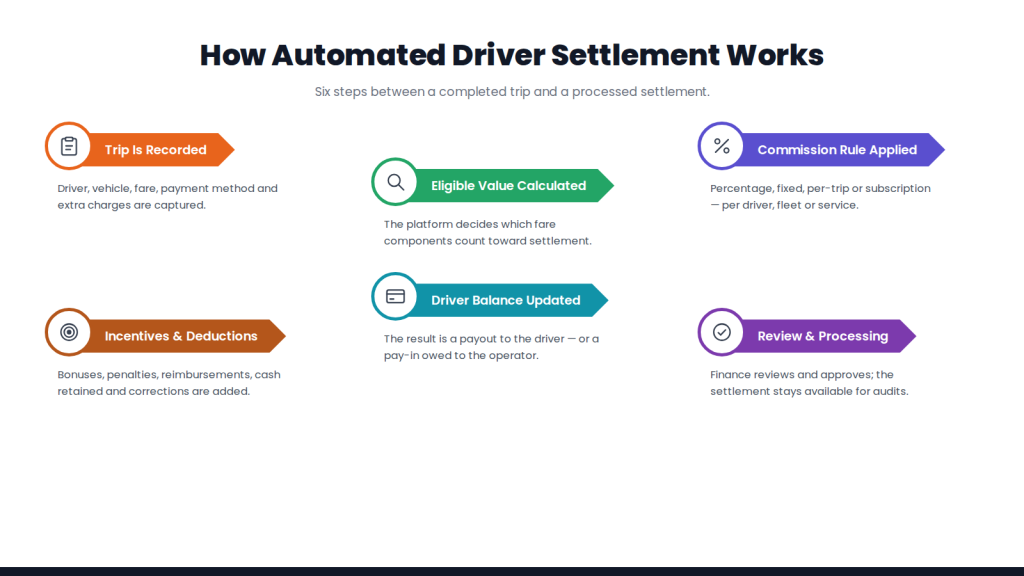
1. The trip is completed
The system records the completed booking along with the driver, vehicle, fare, payment method, service type, trip date, and applicable additional charges.
2. The eligible trip value is calculated
The platform identifies which fare components should be included in the settlement. For example, an operator may treat toll reimbursements differently from the basic fare, or exclude certain taxes from commission calculations.
3. The commission rule is applied
The system applies the appropriate commercial arrangement — percentage commission, fixed commission, per-trip fee, recurring subscription, or another configured rule. Different rules may be required for different drivers, services, fleets or vehicle categories.
4. Incentives and deductions are added
The platform considers relevant credits and debits, including bonuses, penalties, reimbursements, outstanding balances, cash retained, previous adjustments, and approved corrections.
5. The driver balance is updated
The system determines the financial position between the driver and the operator. The result may be a payout, where the operator owes the driver, or a pay-in, where the driver owes the operator.
6. The settlement is reviewed and processed
An administrator or finance team can review the statement before approving the final transaction. The completed settlement should remain available for future reconciliation, reporting and dispute investigation.
How is a taxi driver payout calculated?
The exact calculation depends on the operator’s business model, but a basic formula is: driver payout = gross eligible earnings − operator commission − cash retained − deductions + bonuses + reimbursements ± approved adjustments.
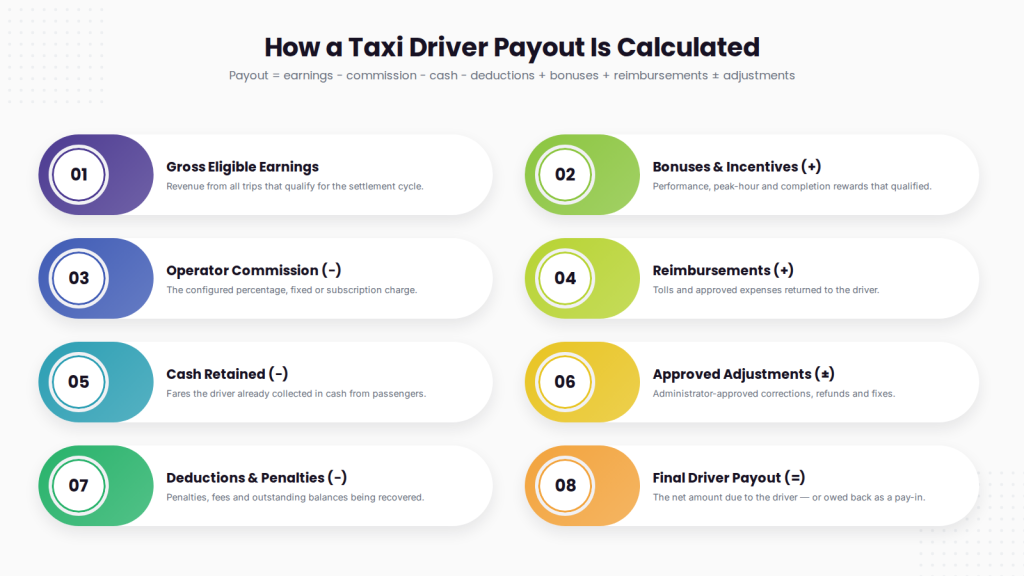
Driver settlement example
Assume a driver completes multiple trips during a weekly settlement cycle.
| Settlement item | Amount |
| Gross eligible trip revenue | $1,000 |
| Operator commission at 20% | −$200 |
| Cash collected by driver | −$300 |
| Performance incentive | +$75 |
| Toll reimbursement | +$25 |
| Penalty adjustment | −$20 |
| Final payout to driver | $580 |
In this example, the passenger revenue alone does not determine the payout. The calculation also accounts for money already held by the driver, the operator’s commission, an incentive, a reimbursement and a penalty. Operators should configure settlement formulas according to their actual commercial agreements, tax rules and accounting policies.
What is a driver wallet in a taxi driver payment software?
A driver wallet is a digital financial ledger connected to an individual driver account that records trip earnings, commission deductions, recharges, bonuses, penalties, cash collections, pay-ins, payouts and manual adjustments. It is not necessarily a conventional bank account; its purpose is to show the driver’s financial position within the taxi driver payment software.
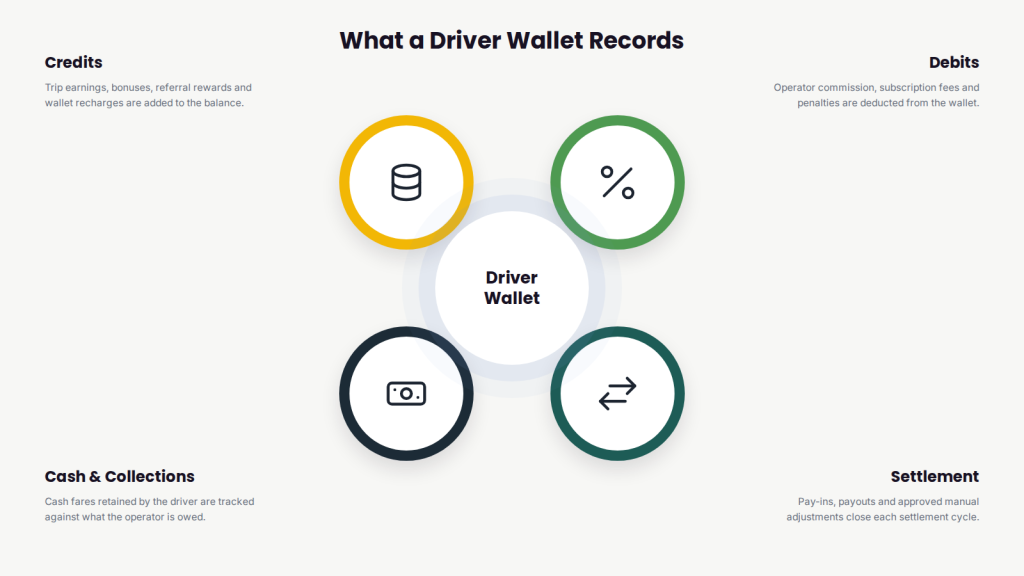
Prepaid vs postpaid driver wallets
Two common wallet arrangements are prepaid and postpaid.
| Area | Prepaid driver wallet | Postpaid driver wallet |
| Starting position | Driver adds funds in advance | Driver starts without advance funding |
| Commission collection | Deducted from wallet balance | Accumulated as an amount owed |
| Balance behaviour | Balance decreases after eligible trips | Negative or outstanding balance may increase |
| Operator exposure | Usually lower | Requires debt or credit controls |
| Driver requirement | Maintain sufficient balance | Settle the balance after the cycle |
| Suitable for | Advance commission collection | Established post-trip settlement arrangements |
| Important control | Low-balance threshold | Maximum outstanding-balance limit |
How a prepaid driver wallet works. The driver adds money to the wallet before completing trips. After each eligible ride, the operator’s commission is deducted from the available balance, and the system may warn or restrict the driver when the wallet falls below a defined threshold.
How a postpaid driver wallet works. The driver does not fund the wallet in advance. Instead, commission and other amounts owed to the operator accumulate during the settlement period, and the driver clears the outstanding balance according to the agreed cycle. Neither model is universally suitable — prepaid lowers operator exposure, while postpaid suits established drivers under a post-trip settlement arrangement.
What is the difference between pay-in and payout?
| Term | Meaning | Example |
| Pay-in | The driver owes money to the operator | A driver collected cash fares but has not yet paid the operator’s commission |
| Payout | The operator owes money to the driver | The operator received online payments and must transfer the driver’s earnings |
| Zero settlement | Neither party owes money after adjustments | Cash, commission, bonuses and prior balances cancel one another out |
A fleet may experience both pay-ins and payouts during the same settlement period, because different drivers and payment methods create different financial positions.
What features should taxi driver payment software have?
The right system should do more than calculate a final number — it should offer flexible commission configuration, trip-level history, cash reconciliation, incentive and deduction management, configurable cycles, transparent statements, approval controls, an audit trail, reports, integrations and role-based access.
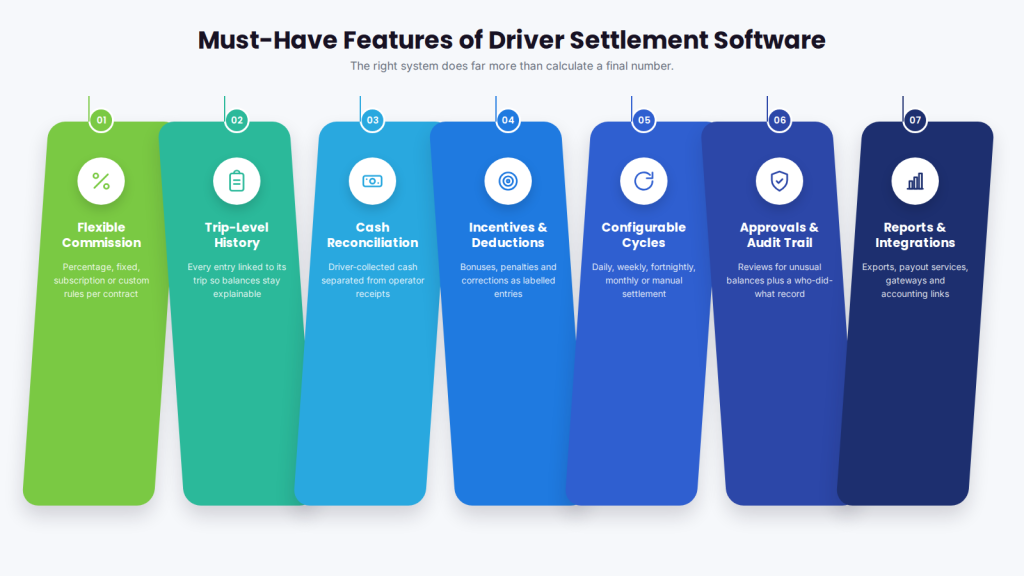
- Flexible commission configuration — percentage, fixed, subscription or custom rules for different contracts.
- Trip-level transaction history — every entry linked to the relevant trip so balances are explainable.
- Cash-ride reconciliation — distinguishing money collected by drivers from payments received by the operator.
- Incentive and deduction management — bonuses, penalties, reimbursements and corrections as separate, labelled entries.
- Configurable settlement cycles — daily, weekly, fortnightly, monthly, or manually initiated.
- Driver earnings statements — showing how gross revenue became final earnings, not just a total.
- Approval controls — review of high-value adjustments, unusual balances or settlements above a limit.
- Audit trail — a record of who created, edited and approved each adjustment.
- Reports and exports — driver earnings, collected commission, pending pay-ins and payouts, bonuses, deductions, wallet balances, failed transactions, and settlement history.
- Payment and accounting integrations — gateways, payout services, accounting platforms or exportable finance files.
- Role-based access — drivers, dispatchers, administrators and finance staff with appropriate permissions.
What are the benefits of automated driver billing?
Automated driver billing speeds up settlement, reduces calculation errors, improves driver transparency and cash-flow visibility, eases reconciliation, scales with the fleet, and strengthens dispute handling — without removing human oversight.
Faster settlement processing removes much of the repetitive work of collecting trip records, applying formulas and creating statements, freeing finance teams to review exceptions. Consistent rule application reduces errors from copying figures between spreadsheets, applying the wrong rate, overlooking cash collections, or double-entering an adjustment. Drivers can see the transactions behind their balance, which makes earnings conversations factual because both sides review the same trip-level records. Operators gain a clearer view of money owed to and by drivers, outstanding wallet balances, pending settlements and collected commission. Reconciliation is easier when trip, fare, payment and driver records connect through one system, and the whole process scales as repeatable rules replace growing manual workload. Finally, disputes become specific — a driver can question one deduction or trip rather than an unexplained weekly total, and the administrator can review the trip, rule, adjustment history and approval record.
Manual vs automated driver settlement
| Area | Manual settlement | Automated settlement |
| Trip-data collection | Gathered from different records | Connected to completed trips |
| Commission calculation | Spreadsheet or manual formula | Configured rule |
| Cash reconciliation | Checked separately | Included in settlement logic |
| Incentive calculation | Reviewed manually | Applied according to configured conditions |
| Driver statements | Prepared individually | Generated by settlement cycle |
| Corrections | Difficult to trace | Recorded as adjustments |
| Approval | Informal or spreadsheet-based | Role and workflow based |
| Audit history | Limited | Transaction-level record |
| Driver visibility | Final amount may be unclear | Itemised earnings and deductions |
| Scalability | Increasing administrative workload | Repeatable across a growing fleet |
Automation does not mean removing administrators from financial decisions. A reliable workflow combines automated calculation with human review for unusual transactions, disputes and exceptions.
How to choose taxi driver payment software
Before selecting a platform, document how your fleet currently pays and charges drivers, then make any demo test your actual settlement scenarios — not a clean sample trip. The evaluation areas below are where products genuinely differ.
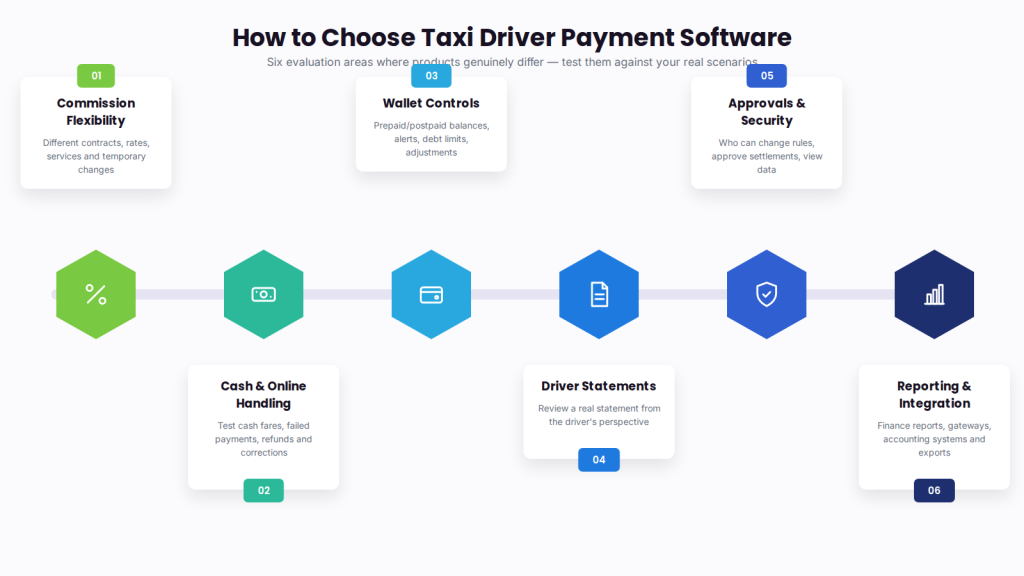
Commission flexibility. Ask whether the system supports different driver contracts, percentage and fixed commission, service-specific rates, vehicle-owner arrangements, and temporary commission changes.
Cash and online payment handling. Test what happens when the passenger pays the operator online, pays the driver in cash, a payment fails, a refund is issued, or a charge is corrected after settlement.
Driver wallet controls. Check support for prepaid or postpaid balances, recharge history, minimum-balance alerts, maximum-debt limits, wallet restrictions, and approved manual adjustments.
Driver statements. Review an actual statement from the driver’s perspective — they should understand which trips were included, how commission was calculated, why an incentive or deduction applied, and how the final balance was reached.
Approval and security. Ask who can change commission rules, add adjustments, approve settlements, process payouts, export reports, and view sensitive driver information.
Reporting and reconciliation. Verify the reports operations and finance teams need; don’t assume a general revenue dashboard is enough for driver settlement.
Integration support. Confirm the exact payment gateways, accounting systems, payout providers and APIs available for your region.
Data portability. Ask whether settlement records, wallet balances and driver transaction histories can be exported if you later change systems.
Implementation support. The vendor should explain configuration, data migration, testing, staff training, driver communication, and post-launch support.
Questions to ask during a driver settlement software demo
Use these to keep the demonstration focused on operational reality:
- Can different drivers use different commission plans?
- Can commission be calculated as a percentage or fixed amount?
- How are cash trips reconciled?
- How are bonuses, penalties and reimbursements recorded?
- Does the system support prepaid and postpaid wallets?
- Can wallet thresholds or debt limits be configured?
- What information appears in the driver statement?
- Can settlements be reviewed before approval?
- How are refunds and post-trip adjustments handled?
- Is every manual change recorded in an audit history?
- Can payout and commission reports be exported?
- Which payment and accounting integrations are supported?
- How are failed or partial payments handled?
- Can drivers raise transaction-level disputes?
- Can historical balances and statements be migrated?
- Is the settlement functionality included in the quoted package?
How to implement a driver settlement system
Document the current financial model — every way money moves between passengers, drivers, vehicle owners and the operator, including payment methods, commission plans, settlement cycles, wallet rules, bonuses, deductions, tax treatment, refunds and approval responsibilities.
Standardise commission rules — resolve inconsistent or undocumented arrangements before configuring the software. Automation applies the rules it is given; it cannot correct an unclear commercial policy.
Clean driver and balance data — verify active drivers, opening wallet balances, unpaid commissions, pending payouts, vehicle-owner relationships, and previous adjustments.
Configure roles and permissions — finance staff, administrators and dispatchers should receive only the access their responsibilities require.
Test realistic scenarios — online payments, cash rides, mixed payment cycles, incentives, penalties, refunds, cancelled rides, negative wallet balances, and manual adjustments.
Run parallel settlements — for one or more cycles, compare the new system’s results against the existing process before relying on it completely.
Train administrators and drivers — finance teams on configuration and approval controls, drivers on reading their earnings, wallet balance and statement.
Review the first settlement cycles — with particular attention to exceptions, disputed entries and rounding differences.
How AllRide supports connected taxi payment operations
Driver settlements work best when connected to the wider taxi-operation lifecycle, because settlement depends on accurate information from the booking, trip, fare and payment systems.
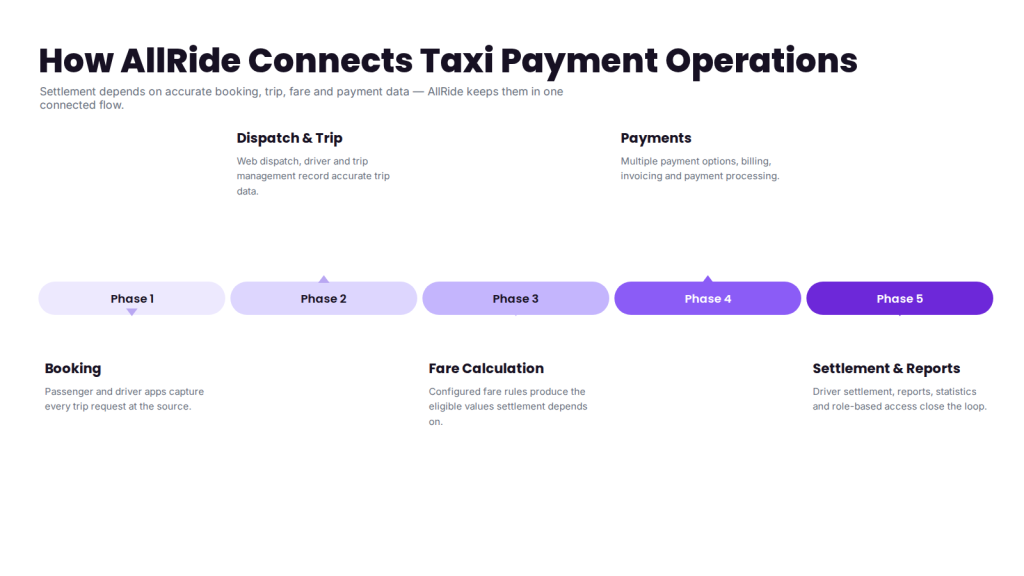
AllRide Cab brings together operational functions including driver and trip management, fare calculation, web dispatch, passenger and driver applications, multiple payment options, billing and invoicing, reports and statistics, payment processing, and role-based access. This connected structure matters because driver settlement does not operate in isolation — rather than transferring trip records between disconnected tools, operators can evaluate a unified setup in which relevant financial data flows through the wider cab-management platform.
The exact wallet, commission, payout and integration configuration should be validated against the operator’s business model and selected AllRide package.
Evaluating driver payment software for your fleet? See how AllRide can connect bookings, trips, fare management, drivers, payments and operational reporting in one configurable platform. Book a 20-minute demo.
Frequently asked questions
What is taxi driver settlement software?
Taxi driver settlement software calculates and records the financial balance between a taxi operator and its drivers. It considers trip earnings, commissions, cash collections, bonuses, deductions and other adjustments.
Is driver billing the same as passenger billing?
No. Passenger billing determines what the customer pays. Driver billing determines how the resulting revenue is divided between the operator and driver.
Is driver settlement software a payroll system?
Not always. It may manage contractor or commission-based earnings without replacing employee payroll, tax filing or statutory employment processes.
What is a driver wallet?
A driver wallet is a digital ledger that records credits, debits, commission, earnings, recharges, incentives and other transactions connected to a driver account.
What is a driver pay-in?
A pay-in is an amount the driver must pay to the operator. This can occur when the driver has collected cash fares and still owes the operator its commission or other charges.
What is a driver payout?
A payout is an amount the operator must pay to the driver after considering eligible earnings, commission, cash collections, bonuses, deductions and adjustments.
Can the software manage cash rides?
A suitable settlement system should identify cash collected directly by drivers and include it in the final pay-in or payout calculation.
How often can drivers be settled?
Settlement cycles may be daily, weekly, fortnightly, monthly or manually initiated, depending on the operator’s policies and platform capabilities.
Can bonuses and penalties be automated?
They can be calculated automatically when the qualification rules are clearly configured. Administrators should still have controls for reviewing exceptions and corrections.
Can a driver have a negative wallet balance?
In a postpaid model, the wallet may show an amount owed by the driver. Operators should define balance limits and collection rules before enabling this arrangement.
Does settlement software integrate with accounting platforms?
Some platforms provide direct integrations, APIs or exportable reports. Operators should verify support for their specific accounting system and required data fields.
Can small taxi fleets use automated driver settlement?
Yes. A smaller operator may benefit when it manages different commission plans, cash rides or repeated weekly settlements. The decision should be based on operational complexity rather than fleet size alone.