


 Fleet Management
 Route optimization
 Shuttle Transportation
 Delivery Management
 School Bus Transportation
 Ride Sharing Management
 Airport Transfer Booking
  Vehicle inspection
 Car Rental Management
 Trucking & Logistics
 Food & Beverage
 E-Commerce
 Passenger Transit
 Delivery
 School & Corporate
Seat Allocation Software for Shuttle Fleets: Buyer’s Guide to Fixed Seating & Reservations
Seat allocation software controls how individual seats on a shuttle or bus departure are held, assigned and released — managing seat inventory, seat maps, fixed versus open seating rules, accessibility and priority seats, group bookings, and the manifest the driver sees. It’s the difference between selling a ride and selling a specific seat, and for fixed-capacity fleets it’s the mechanism that prevents the single most visible service failure: more riders than places.
Key takeaways
- Seat inventory and seat allocation are different capabilities — check both.
- Fixed (assigned) seating and open seating need different software support.
- A seat map is only useful when the vehicle layout is configurable.
- Accessibility, priority and blocked seats must be reservable separately.
- Group bookings and mid-route boarding are where naive systems break.
- Overbooking rules should be a deliberate policy, not an accident.
Why seat allocation deserves its own evaluation
Most transport platforms count capacity as a single number: this vehicle seats sixteen, so stop selling at sixteen. That works until it doesn’t. A wheelchair position occupies the space of two seats. A family of four wants to sit together. A rider with a season pass expects the same seat every morning. A vehicle swap mid-week changes the layout entirely. Three riders board at stop four, after two others alighted at stop three — so was that departure ever actually full?
Each of those is a seat-level problem, and none is solved by a capacity counter. For shuttle and bus operators running fixed-capacity vehicles on recurring routes, seat handling is where the operational detail lives, and it’s routinely under-examined during software selection because a demo with an empty vehicle looks identical on every platform.
This guide explains how seat allocation software works inside shuttle and bus systems, the distinction between counting seats and assigning them, how fixed and open seating differ, the edge cases that expose weak implementations, and what to test before buying. For the broader picture of running shuttle operations, see our shuttle software guide — this article goes one level deeper into the seating layer.
Seat inventory vs seat allocation: the distinction that matters
Seat inventory counts how many places remain on a departure; seat allocation assigns a specific, identified seat to a specific rider. Many platforms do the first and market it as the second.
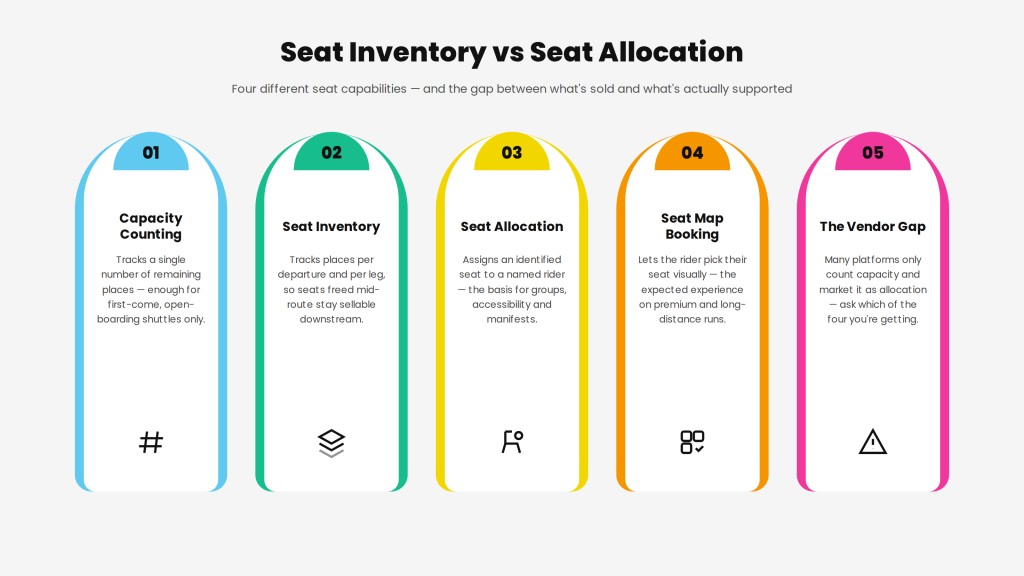
Ask any vendor which of these four they actually support. A platform that only counts capacity cannot honour a reserved wheelchair position, cannot seat a group together, and cannot tell a driver who should be in seat 7. Those may be requirements you don’t have today — but if you do have them, capacity counting will fail quietly rather than obviously.
Fixed seating vs open seating
Fixed (assigned) seating gives each rider a named seat; open seating sells a place and lets riders sit anywhere. Each needs different software behaviour, and many operators run both across different routes.
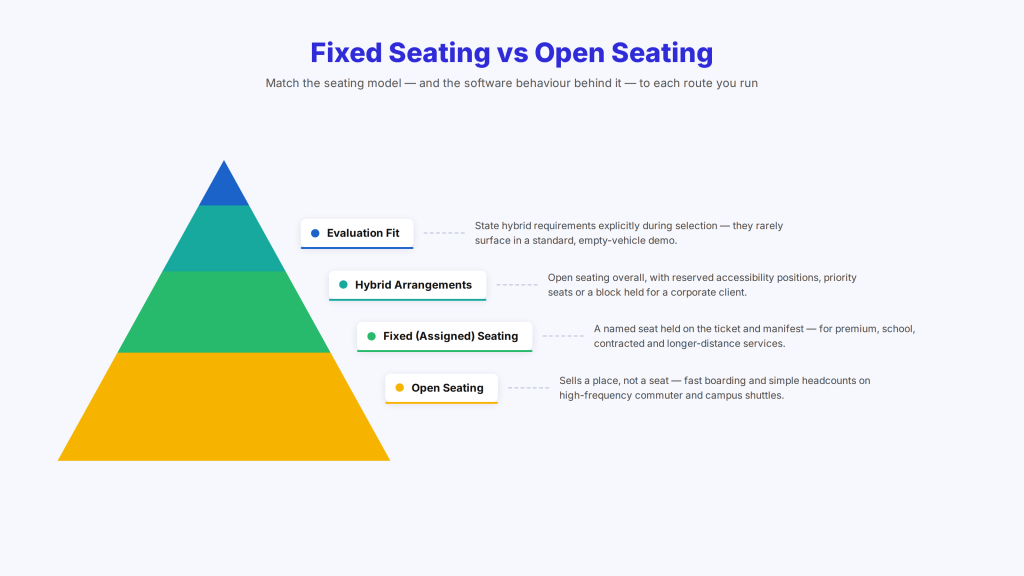
Open seating suits high-frequency commuter and campus shuttles where riders board quickly and turnover is high. The software’s job is straightforward: know how many places exist, stop selling at the limit, and give the driver a headcount. Boarding speed matters more than seat identity.
Fixed or assigned seating suits longer journeys, premium services, contracted employee routes with allocated places, school transport, and any service where riders expect certainty. Here the software must hold a specific seat, show it on the ticket or pass, present it in the manifest, and handle changes when a vehicle is substituted.
Hybrid arrangements are common and often overlooked: open seating generally, but with reserved accessibility positions, priority seats for specific riders, or a block held for a corporate client. If you need this, say so explicitly during evaluation — hybrid handling is a genuine differentiator and rarely appears in a standard demo.
Seat maps and vehicle layouts
A seat map is only as useful as the layout configuration behind it — the system must model your actual vehicles, not a generic bus diagram.
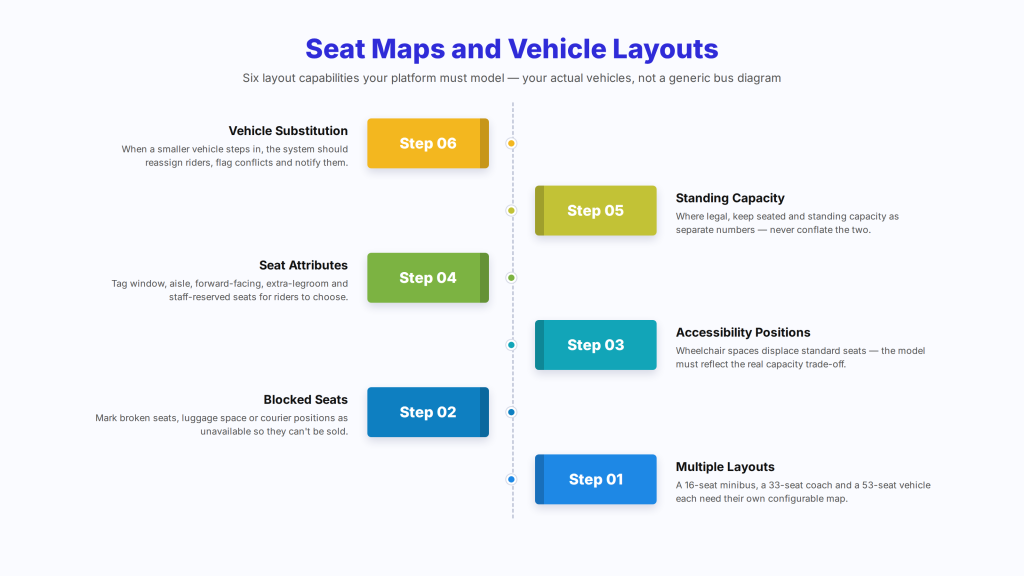
Look for the ability to define layouts per vehicle type, with the correct row and column arrangement, aisle positions, and seat numbering that matches what’s physically labelled in the vehicle. Riders and drivers get confused fast when the app says seat 12 and the vehicle’s seat 12 is somewhere else.
Then check these layout capabilities:
- Multiple layouts — a 16-seat minibus, a 33-seat coach and a 53-seat vehicle all need their own maps.
- Blocked or unavailable seats — a broken seat, a seat removed for luggage, or a position reserved for a courier.
- Wheelchair and accessibility positions — these usually displace standard seats, so the model must reflect the actual trade-off rather than treating them as ordinary seats.
- Seat attributes — window, aisle, forward-facing, extra legroom, or seats reserved for staff.
- Standing capacity — where legal and applicable, seated and standing capacity are separate numbers and shouldn’t be conflated.
- Vehicle substitution — when a smaller vehicle replaces a larger one, what happens to riders assigned to seats that no longer exist? This is the question that exposes weak implementations.
That last point deserves emphasis. Vehicle swaps happen constantly in real operations. A system that can reassign affected riders, flag conflicts and notify them is worth considerably more than one that leaves a dispatcher reconciling a seating chart by hand at 6am.
The edge cases that break naive seat systems
Seat allocation looks simple with one rider and an empty vehicle. These six scenarios are where implementations diverge — test each one.
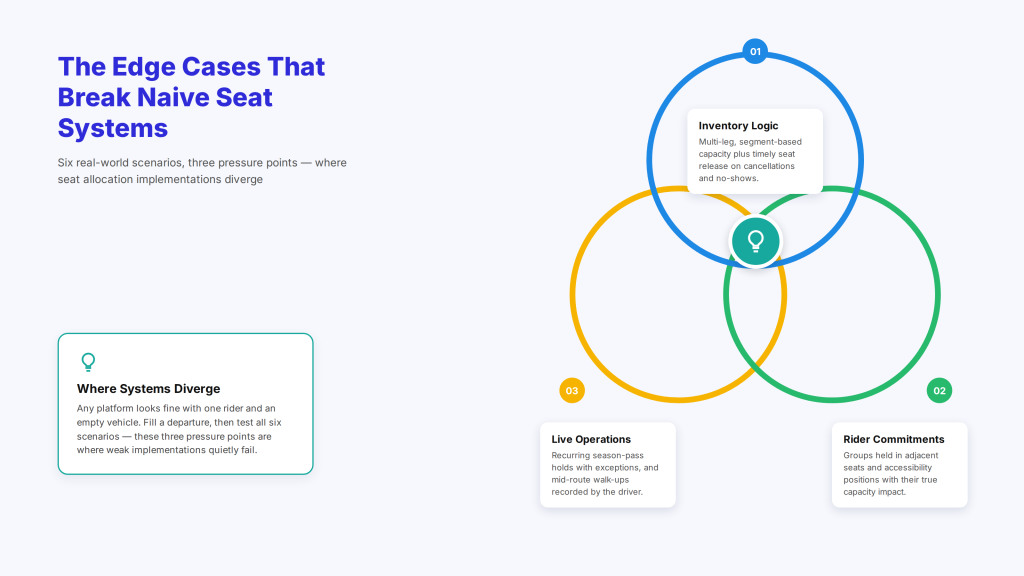
1. Multi-leg capacity. On a route with multiple stops, a rider travelling from stop 1 to stop 3 frees their seat for stops 3 onward. A system that treats capacity as one number per departure will show the vehicle full when seats are genuinely available for later legs — costing you revenue on every route with mid-journey turnover. Segment-based inventory solves this; ask whether the platform supports it.
2. Group bookings. A group of five wants to travel together. Can the system hold five adjacent seats, keep them together through changes, and release the whole block on cancellation? Or does it allocate five scattered seats and leave the driver to sort it out?
3. Accessibility positions. A wheelchair space usually replaces two or more standard seats, must be reservable specifically, and may require the adjacent seat to be held for a companion. Treating it as one ordinary seat under-counts the capacity impact and can leave a rider without the space they booked.
4. Recurring and season bookings. An employee with a monthly pass may hold the same seat every weekday. The system needs to create the recurring hold, handle exceptions (holidays, absences), and release the seat when they’re not travelling so it can be resold.
5. Cancellations and no-shows. A cancelled booking should return its seat to inventory immediately. A no-show shouldn’t — until your policy says it can be released, which for a departing vehicle may be at the point of departure. Check the timing rules, since this directly affects load factor.
6. Mid-route boarding without a booking. Walk-up riders on a shuttle route are common. Can the driver record a boarding against a free seat from the app, and does that update inventory for downstream stops?
Overbooking: policy, not accident
Deliberate overbooking can raise load factor on routes with predictable no-shows, but it has to be an explicit, configurable policy with a defined fallback — accidental overbooking is a service failure.
If a platform supports it, confirm you can set an overbooking allowance per route or departure rather than globally, since a 5% allowance that works on a commuter route may be reckless on an airport shuttle where every rider has a flight. Also confirm what happens when more riders arrive than seats exist: is there a defined bump policy, a next-departure guarantee, compensation handling, and a record of the incident?
Many small operators are better served by not overbooking and instead tightening cancellation windows and no-show release rules. Either approach is defensible; what isn’t is discovering your platform allows overselling by default.
Manifests, boarding and verification
The seat allocation only matters if it reaches the driver, so check what the manifest shows and how boarding is confirmed.
The driver’s manifest should list expected riders by stop, with seat assignments where applicable, group associations, accessibility requirements and any special instructions. Boarding verification varies by setting — a name check on a corporate shuttle, a QR code or pass scan on a campus service, a photo ID on a contracted route — so confirm the platform supports the method your contracts require.
Two practical checks: does the manifest update live when a booking changes after the driver has started, and does it work when connectivity drops? A manifest that only exists as a live web page is useless in a signal blackspot, which is where a great many routes run.
Reporting: what seat data tells you
Seat-level data is the clearest picture of whether a route is commercially viable, so make sure you can get it out.
Useful reporting includes load factor by departure, route and day of week; seat utilisation by segment on multi-stop routes; no-show rates by rider and by route; the gap between booked and boarded; accessibility position usage; and revenue or cost per seat. Load factor by segment is the number most likely to change a decision — it’s what tells you whether a route needs a smaller vehicle, a schedule change, or cancelling.
For contracted services, this data is also what you present at renewal. An employer paying for a shuttle wants to see it’s used; a campus wants to see peak loads justify the frequency.
What seat allocation adds to the cost
Seat-level functionality is often gated behind a higher tier or priced per seat or booking, so confirm where it sits before assuming it’s included.
| Cost line | What to confirm |
| Tier gating | Whether seat allocation requires a higher plan than capacity counting |
| Pricing basis | Per seat, per booking, per vehicle or flat |
| Seat map configuration | Whether layouts are self-service or a paid setup task |
| Additional layouts | Cost of adding vehicle types later |
| Rider-facing seat selection | Whether a seat map in the rider app is extra |
| Accessibility handling | Whether specialised seat types are supported at your tier |
| Reporting | Whether segment-level load factor needs a higher tier |
Watch per-seat or per-booking pricing in particular. On a well-utilized route, filling seats is the goal — so a pricing model that charges more as you succeed puts your cost and revenue on different curves. (For the broader pricing picture, see our guide to transport software pricing models; insert verified vendor figures where you need published numbers.)
How to test seat allocation in a demo
Empty-vehicle demos tell you nothing. Make the vendor fill a departure and then break it.
Run these ten tests in any seat allocation software demo or free trial:
- Configure a seat map matching one of your actual vehicles.
- Add a second, different vehicle layout.
- Block a seat as unavailable.
- Configure a wheelchair position and show how it affects total capacity.
- Book a group of five and confirm they’re seated together.
- Fill a departure to capacity and attempt one more booking.
- Cancel a booking and confirm the seat returns to inventory.
- On a multi-stop route, book stop 1 to stop 3 and check whether stop 3 onward shows availability.
- Substitute a smaller vehicle and see what happens to assigned riders.
- Show the driver’s manifest, including seat numbers and accessibility requirements.
Then ask the commercial questions: which tier includes seat allocation, how layouts are configured and by whom, whether rider-facing seat selection costs extra, and how segment-level load factor is reported. (Our dispatch software buyer checklist covers the wider evaluation framework.)
Common mistakes when buying seat-level software
- Accepting capacity counting as seat allocation. They’re different; ask which you’re getting.
- Not testing multi-leg routes. Single-number capacity silently costs revenue on every route with turnover.
- Treating accessibility positions as ordinary seats. It under-counts capacity impact and fails riders.
- Ignoring vehicle substitution. It happens weekly; a system that can’t handle it creates manual work.
- Skipping group bookings. Scattered seating for a group is a complaint waiting to happen.
- Leaving overbooking on by default. It should be a deliberate policy with a fallback, or off.
- Forgetting the manifest offline. Routes run through signal blackspots.
- Choosing per-seat pricing on fixed-fee contracts. Costs rise with utilisation while revenue doesn’t.
How AllRide Bus fits seat-based shuttle operations
AllRide Bus is the shuttle, bus and scheduled group transport product in the AllRide Apps suite, covering employee and corporate shuttles, school and campus transport and scheduled route services, alongside AllRide Cab for taxi and transfer work.
The confirmed platform capabilities relevant here are multi-channel booking; automated dispatch and driver assignment with manual control; real-time GPS tracking and route optimization; configurable fares and service zones; payment gateway integration; branded rider and driver apps; and reporting dashboards.
On seating specifically, we’d rather you ask than assume. Seat-level inventory, seat maps and vehicle layout configuration, assigned versus open seating, accessibility positions and segment-based capacity are exactly the capabilities this guide tells you to verify with any vendor, and they vary by platform and configuration across the whole category. Raise them directly with us — including what’s achievable through the platform’s integrations — before shortlisting anyone, ourselves included. If seat allocation is your deciding requirement, it should be the first thing you test on every platform, not the last.
Talk through your seating requirements with the AllRide team — book a free demo.
Frequently asked questions
What is seat allocation software?
Seat allocation software assigns specific, identified seats to individual riders on a departure, rather than simply counting how many places remain. It manages seat maps and vehicle layouts, fixed versus open seating rules, accessibility and blocked seats, group bookings, and the manifest the driver uses to see who should be seated where.
What’s the difference between seat inventory and seat allocation?
Seat inventory tracks how many places are available on a departure. Seat allocation assigns a particular seat to a particular rider. Many platforms provide inventory and describe it as seat allocation, so ask directly — inventory alone cannot honour a reserved accessibility position, seat a group together, or tell a driver who belongs in a specific seat.
Do shuttle operators need assigned seating?
It depends on the service. High-frequency commuter and campus shuttles usually work fine with open seating and a headcount. Assigned seating matters for longer journeys, premium services, contracted employee routes with allocated places, school transport, and anywhere riders expect certainty — and for accessibility positions, which should be reservable on any service.
How does seat allocation work on multi-stop routes?
Properly implemented, capacity is tracked per segment: a rider travelling from stop 1 to stop 3 frees their seat for stops 3 onward. Systems that track a single number per departure will show a vehicle full when later legs have space, which costs revenue on every route with mid-journey turnover. Ask specifically whether segment-based inventory is supported.
How should accessibility seats be handled?
A wheelchair position typically displaces two or more standard seats, so the vehicle layout must reflect that trade-off rather than counting it as one ordinary seat. The position should be individually reservable, may require an adjacent companion seat to be held, and must appear clearly on the driver’s manifest so the space is genuinely available on arrival.
Can seat allocation software handle group bookings?
Good implementations can hold adjacent seats for a group, keep them together through changes, and release the block on cancellation. Weaker ones allocate scattered seats and leave the driver to rearrange people. If groups are common on your services, test this specifically with a booking of four or five during any demo.
What is a seat map in booking software?
A seat map is a visual representation of the vehicle layout that riders or staff use to select a specific seat. It’s only useful when the underlying layout is configurable to your actual vehicles — correct rows, aisles, numbering that matches the physical labels, blocked seats, and accessibility positions. A generic diagram that doesn’t match the vehicle causes confusion at boarding.
Should shuttle operators allow overbooking?
Only as a deliberate, configurable policy with a defined fallback. Overbooking can raise load factor where no-shows are predictable, but it needs per-route allowances, a bump policy, and incident records. Many small operators do better by tightening cancellation windows and no-show release rules instead. What matters is that overselling is never the default behaviour.
What happens when a smaller vehicle replaces a larger one?
This is one of the best tests of a seat system. Riders assigned to seats that no longer exist need reassigning, conflicts need flagging, and affected riders need notifying. A platform that handles substitution automatically saves significant manual work, since vehicle swaps happen regularly in real operations.
What seat-level reports should operators track?
Load factor by departure, route and day of week; seat utilisation by segment on multi-stop routes; no-show rates; the gap between booked and boarded; accessibility position usage; and revenue or cost per seat. Segment-level load factor is usually the most decision-changing number, and for contracted services this data is what justifies the service at renewal.
Conclusion
Seat allocation is one of those capabilities that looks trivial in a demo and becomes the defining constraint in daily operations. The gap between counting places and assigning seats shows up the first time a group books together, a wheelchair user reserves a position, a vehicle is substituted, or a route with mid-journey turnover silently sells out while half the seats sit empty for the second half of the journey.
Decide whether your services need assigned seating, segment-based capacity or just a headcount — then make every shortlisted platform fill a departure, break it, and swap the vehicle. To talk through the seating requirements of your routes, book a free AllRide Bus demo.