


 Fleet Management
 Route optimization
 Shuttle Transportation
 Delivery Management
 School Bus Transportation
 Ride Sharing Management
 Airport Transfer Booking
  Vehicle inspection
 Car Rental Management
 Trucking & Logistics
 Food & Beverage
 E-Commerce
 Passenger Transit
 Delivery
 School & Corporate
Flight Tracking Dispatch Software: What Airport Transfer Operators Should Buy
Flight tracking dispatch software monitors each transfer booking’s flight status in real time. It automatically updates the planned pickup time when the flight schedule changes. It also notifies dispatch and the driver. The distinction that matters when buying is simple but frequently missed: storing a flight number is not flight tracking. Many platforms record the number only for reference. Truly flight-aware systems use live status data. They also reschedule the trip without anyone watching a screen.
Key takeaways
- Capturing a flight number and tracking a flight are different capabilities.
- Ask which data source powers tracking and how often it updates.
- Landing time is not pickup time — buffers must be configurable.
- Diversions and cancellations need defined handling, not just delays.
- Automatic driver and passenger notification is where the value lands.
- Test a ninety-minute delay in the demo before you buy anything.
Why flight tracking is the highest-value feature in airport dispatch
Every other part of an airport transfer is predictable. The vehicle is booked, the route is known, the price is agreed. The one variable nobody controls is when the aircraft actually arrives — and that single variable determines whether the whole trip succeeds.
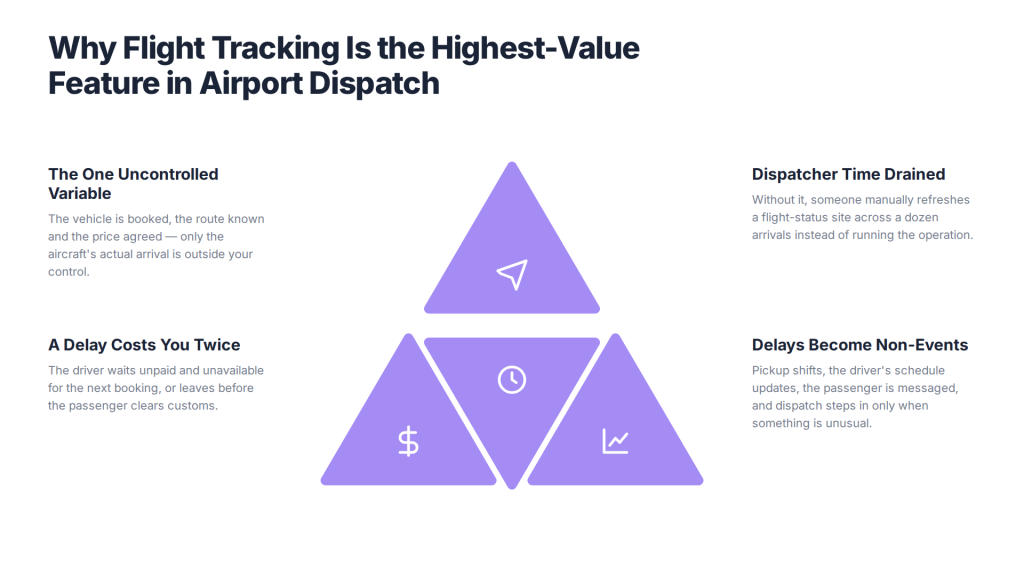
Without flight awareness, a delay costs you twice. The driver dispatched on the original schedule sits at the airport unpaid, burning the vehicle’s availability for the next booking, or leaves before the passenger clears customs and the trip fails entirely. Meanwhile a dispatcher is manually refreshing a flight-status website across a dozen arrivals, and every minute spent doing that is a minute not spent running the operation.
With flight awareness, the same delay becomes a non-event. The booking’s pickup time shifts, the driver’s schedule updates, the passenger receives an accurate message, and the dispatcher only gets involved if something genuinely unusual happens. That’s the entire business case, and it’s why flight tracking dispatch software is worth evaluating on its own rather than as a line in a feature list.
This guide explains how flight tracking actually works inside dispatch software, the questions that separate real capability from a stored field, how delays, diversions and cancellations should be handled, and what to test before you commit.
How does airport transfer software handle flight tracking?
A flight-aware system links each booking to a flight record, pulls live status from a flight-data source, recalculates the planned pickup when the status changes, and pushes the update to the dispatcher, the driver and — where appropriate — the passenger. Four things have to work for that chain to hold.
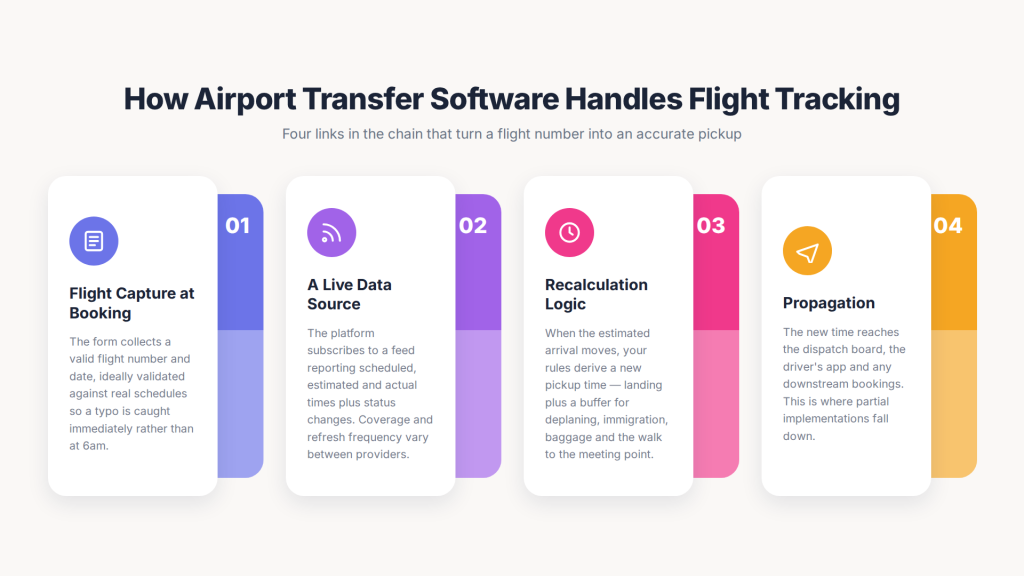
1. Flight capture at booking. The booking form must collect a valid flight number and date, ideally validating it against real schedules so a typo is caught immediately rather than at 6am. For departures, it needs the departure time so a buffer can be applied backwards.
2. A live data source. The platform subscribes to a flight-data feed that reports scheduled, estimated and actual times, plus status changes. Coverage and refresh frequency vary significantly between providers — this is the question most buyers never ask.
3. Recalculation logic. When the estimated arrival moves, the system applies your rules to derive a new pickup time: landing plus a buffer for deplaning, immigration, baggage and walking to the meeting point, adjusted for terminal, domestic versus international, and time of day.
4. Propagation. The new time reaches the dispatcher’s board, the driver’s app, and any downstream bookings that driver was assigned to. This is where many partial implementations fall down — the booking updates, but nothing tells the driver.
If a vendor can demonstrate all four on a live delayed flight, the capability is real. If they can only show you a flight-number field on a booking form, it isn’t.
The questions that separate real flight tracking from a stored field
Ask these seven questions of any vendor claiming flight tracking, and the answers will sort genuine capability from marketing language quickly.
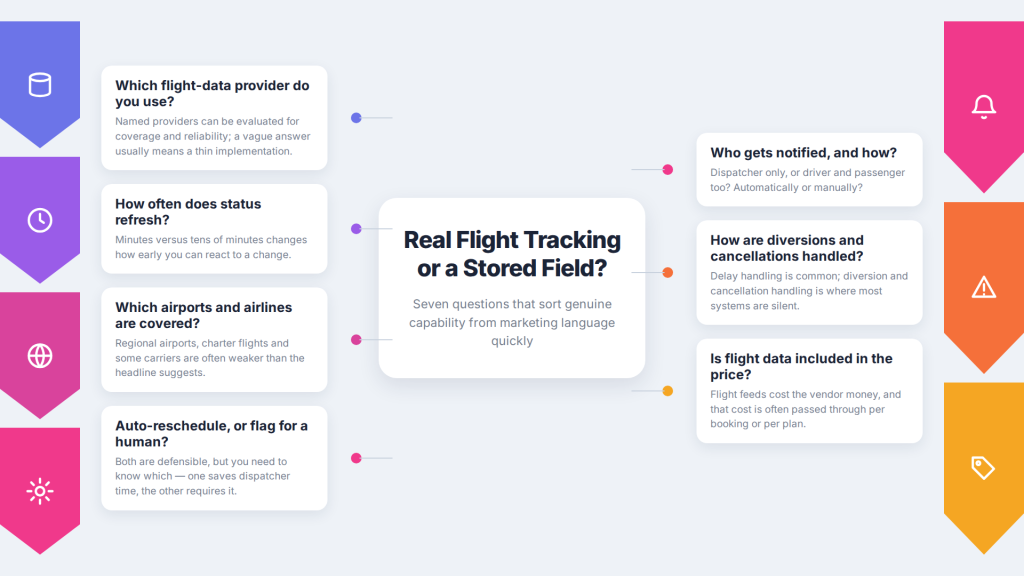
- Which flight-data provider do you use? Named providers can be evaluated for coverage and reliability; a vague answer usually means a thin implementation.
- How often does status refresh? Minutes versus tens of minutes changes how early you can react.
- Which airports and airlines are covered? Coverage of regional airports, charter flights and some carriers is often weaker than the headline suggests.
- Does the system reschedule automatically, or flag for a human? Both are defensible, but you need to know which — one saves dispatcher time, the other requires it.
- Who gets notified, and how? Dispatcher only, or driver and passenger too? Automatic or manual?
- How are diversions and cancellations handled? Delay handling is common; diversion and cancellation handling is where most systems are silent.
- Is flight data included in the price, or billed separately? Flight feeds cost the vendor money, and that cost is often passed through per booking or per plan.
Landing time is not pickup time
The most common configuration error in airport dispatch is treating the aircraft’s landing time as the passenger’s pickup time — the gap between the two is where late pickups and unpaid driver waiting are created.
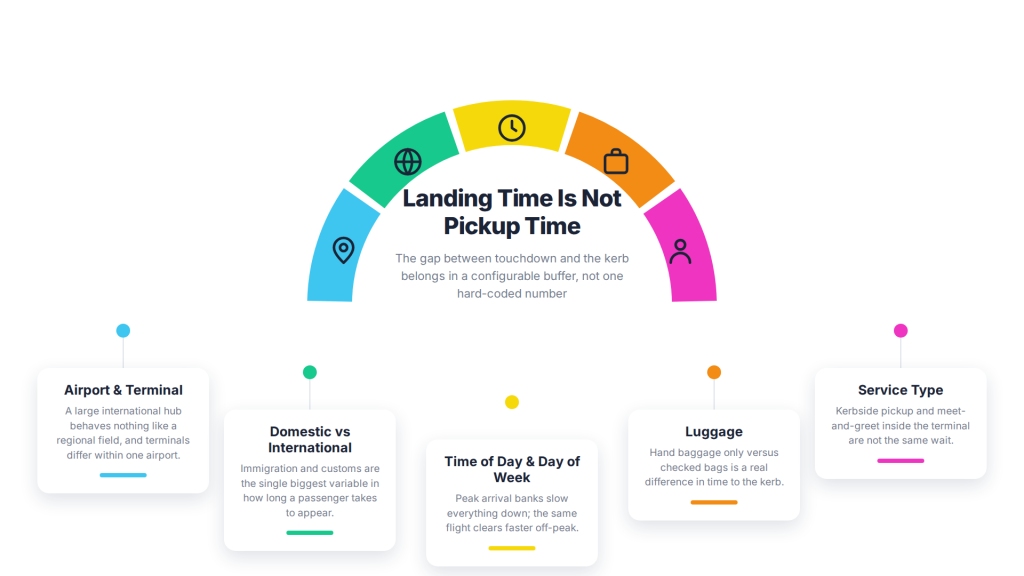
A passenger who lands at 14:05 does not appear at the kerb at 14:05. They deplane, walk, clear immigration, wait for baggage, clear customs, and find the meeting point. That gap varies enormously: a domestic arrival with hand luggage at a small airport might be twenty minutes; an international arrival at a large hub during a busy immigration period can exceed ninety.
Good software lets you configure that buffer rather than hard-coding one number. Look for buffers that can differ by:
- Airport and terminal — a large international hub behaves nothing like a regional field.
- Domestic vs international — immigration and customs are the biggest variable.
- Time of day and day of week — peak arrival banks slow everything down.
- Luggage — hand baggage only versus checked bags is a real difference.
- Service type — kerbside pickup versus meet-and-greet inside the terminal.
For departures, the same logic runs backwards: the pickup must be early enough for check-in, security and the passenger’s own preference, which again varies by airport and route. A platform offering one global buffer setting will be wrong for most of your bookings most of the time.
Handling delays, diversions and cancellations
Delay handling is the baseline; how the system handles diversions, cancellations and early arrivals is what separates mature flight-aware software.
| Event | What good software does | What the dispatcher still decides |
| Minor delay | Silently shifts pickup within tolerance | Nothing — this should be automatic |
| Major delay | Reschedules, alerts dispatch and driver, flags knock-on bookings | Whether to reassign the driver’s later trips |
| Early arrival | Pulls the pickup forward, alerts the driver | Whether the driver can realistically make it |
| Diversion | Flags the booking as exception, halts auto-scheduling | Whether to cancel, reroute or meet at the new airport |
| Cancellation | Flags the booking, stops dispatch, applies policy | Refund, rebooking or charge under your terms |
| Missing flight data | Alerts rather than silently defaulting | Manual monitoring for that booking |
That last row matters more than it looks. A system that quietly falls back to the scheduled time when it can’t get data — without telling anyone — is more dangerous than one with no tracking at all, because your team will trust a schedule that isn’t being maintained.
Two further behaviours worth testing: how the platform handles a delay that cascades, when a driver’s late first pickup threatens their next two bookings; and how it handles multi-leg itineraries, where the passenger’s final inbound leg is the one that matters, not the flight number they typed in first.
Flight tracking and waiting-time policy
Flight tracking only pays off if your waiting rules are anchored to actual landing rather than the original booking time. Otherwise the system reschedules the pickup while your billing still measures from a time that no longer exists.
Configure and confirm: when the free-wait clock starts (landing, a fixed offset after landing, or driver arrival at the meeting point); how long free wait lasts, ideally differing for domestic and international; the chargeable overage rate; how many contact attempts the driver must make; and what evidence is recorded before a no-show is declared.
Get this right and the tracking data becomes your defence in disputes: you can show when the aircraft actually landed, when the driver arrived, and how long they waited. Get it wrong and you have accurate scheduling attached to unenforceable billing.
Integration: build, buy or connect?
If a dispatch platform doesn’t offer native flight tracking, the practical alternatives are integrating a flight-data API, using a partner integration, or accepting manual monitoring — each with a different cost and reliability profile.
Native tracking is simplest: the vendor owns the data relationship, the logic and the support. Confirm what’s included in your plan.
API integration connects a third-party flight-data provider to your dispatch platform. This is viable where the platform has an open, well-documented API, but budget for the development work, the ongoing data subscription, and the fact that you now own the integration when something breaks.
Partner or marketplace integrations sit between the two — check whether the connector is maintained by the vendor or by you.
Manual monitoring is what most small operators actually do: a dispatcher with a flight-status tab open. It works at low volume and stops working fast. If you’re running more than a handful of arrivals a day, the labour cost usually exceeds the software cost.
Whichever route you take, ask what happens to the flight-data cost as your booking volume grows, since many providers price per query or per tracked flight.
What flight-tracking dispatch software costs
Flight tracking is usually bundled into a higher plan tier, charged per tracked booking, or dependent on a third-party data subscription — and it’s one of the most common hidden costs in airport transfer software.
| Cost line | What to confirm |
| Flight data | Included, plan-tier gated, per-booking, or your own subscription |
| Plan tier | Whether tracking forces you onto a more expensive tier |
| Volume behaviour | Cost at peak season, not an average month |
| Notifications | SMS and push costs for delay alerts, often per message |
| Integration | Development cost if tracking isn’t native |
| Coverage gaps | Whether some airports or carriers cost extra or aren’t supported |
Model this at peak season. Airport transfer demand is seasonal, and a per-tracked-flight charge that’s negligible in November can be a meaningful line in July. (For the broader pricing picture, see our guide to transport software pricing models; insert verified vendor figures where you need published numbers.)
How to test flight tracking in a demo
Do not accept a walkthrough of a booking form with a flight-number field — make the vendor demonstrate a live schedule change.
Ask them to run these scenarios in an airport transfer software demo or free trial:
- Book a transfer against a real flight arriving today.
- Show the flight’s live status inside the booking.
- Demonstrate what happens when the estimated arrival moves by ninety minutes — including what the dispatcher sees and what the driver receives.
- Show an early arrival pulled forward.
- Show a diverted flight and a cancelled flight.
- Show a booking where flight data is unavailable, and what the system tells you.
- Show the buffer configuration, and change it by terminal or by domestic versus international.
- Show a cascading delay affecting the driver’s next booking.
- Show the waiting-time clock anchored to actual landing.
- Show the passenger-facing message sent on landing.
Then ask the commercial questions: is flight data included, which provider, what coverage, what happens at your peak volume, and what the fallback is if the data feed fails. (Our dispatch software buyer checklist covers the wider evaluation, and our airport taxi booking software guide covers the rest of the airport transfer workflow.)
Common mistakes when buying flight-aware dispatch software
- Accepting a flight-number field as proof of tracking. They are entirely different capabilities.
- Not asking about the data provider. Coverage and refresh rate determine how well tracking actually performs.
- Using one global buffer. Domestic and international arrivals need different rules, as do different terminals.
- Ignoring diversion and cancellation handling. Delays are common; the rarer events cause the worst failures.
- Leaving waiting rules anchored to the original booking time. Tracking then improves scheduling but not billing.
- Forgetting the driver. If the reschedule doesn’t reach the driver’s app automatically, you’ve automated half a process.
- Pricing on an average month. Per-tracked-flight costs bite in peak season.
- Not testing the failure mode. Ask what happens when the feed goes down — silent fallback is the dangerous answer.
How AllRide fits airport transfer operations
AllRide Apps is an AI-powered, white-label transport platform with AllRide Cab covering private airport transfers, taxi and chauffeur work and AllRide Bus covering shared shuttle and scheduled group transport.
For airport operators, the confirmed platform capabilities are multi-channel booking across app, web and phone with instant and scheduled trips; automated dispatch and driver assignment with manual dispatcher control; real-time GPS tracking and route optimisation; configurable fares and service zones; payment gateway integration; branded passenger and driver apps; and reporting dashboards — plus 50+ language and multi-currency support and 100+ API integrations, which matter for operators serving international arrivals.
On flight tracking specifically, we’d rather be straightforward than vague: this is a capability that varies significantly across the category and by configuration, so ask us directly how flight data and delay handling can be supported for your setup, including what can be achieved through the platform’s API integrations, before assuming any vendor — this one included — covers it out of the box. That’s the same advice this guide gives for every platform on your shortlist, and it’s the question worth asking first.
Discuss your airport transfer workflow with the AllRide team — book a free demo.
Frequently asked questions
What is flight tracking dispatch software?
Flight tracking dispatch software monitors the live status of the flight attached to each transfer booking and adjusts the planned pickup time automatically when that flight moves, notifying dispatch and the driver. It differs from software that merely stores a flight number for reference, which provides no automatic rescheduling and still requires manual monitoring.
How does airport transfer software handle flight tracking?
A flight-aware system links the booking to a flight record, pulls live status from a flight-data provider, recalculates the pickup time using configured buffers for deplaning, immigration and baggage, and pushes the update to the dispatcher, driver and passenger. All four steps need to work — many partial implementations update the booking but never notify the driver.
Is storing a flight number the same as flight tracking?
No, and this is the most common misunderstanding when buying. Storing a flight number gives dispatchers a reference to check manually. Flight tracking means the platform ingests live status data and reschedules automatically. Ask any vendor to demonstrate a live delayed flight rather than showing you the booking form field.
What flight data sources do dispatch platforms use?
Platforms subscribe to third-party flight-data providers that report scheduled, estimated and actual times plus status changes, drawn from airline, airport and surveillance sources. Coverage, refresh frequency and reliability vary between providers, so ask which one a vendor uses, which airports and carriers are covered, and how often status updates.
How should pickup buffers be set after landing?
Buffers should be configurable rather than fixed, because the gap between landing and the passenger reaching the meeting point varies by airport and terminal, domestic versus international arrival, time of day, luggage, and whether the service is kerbside or meet-and-greet. A single global buffer will be wrong for most bookings.
What happens when a flight is diverted or cancelled?
Good software flags the booking as an exception, stops automatic scheduling and alerts the dispatcher, who decides whether to cancel, rebook, or meet the passenger at another airport under your policy. Delay handling is common across platforms; diversion and cancellation handling is where many systems are silent, so test both.
Does flight tracking cost extra?
Often, yes. Flight data costs vendors money, so it may be gated behind a higher plan tier, charged per tracked booking, or require your own data subscription. Notification costs for delay alerts may also be billed per message. Confirm the total at peak-season volume rather than an average month.
Can flight tracking be added to dispatch software that doesn’t have it?
Sometimes, through an API integration with a third-party flight-data provider, if the platform has an open and well-documented API. Budget for development work, the ongoing data subscription and maintenance, since you then own that integration. The alternatives are switching to a natively flight-aware platform or accepting manual monitoring, which stops scaling quickly.
How do I test flight tracking during a demo?
Have the vendor book a transfer against a real flight arriving that day, then demonstrate a ninety-minute delay, an early arrival, a diversion, a cancellation, and a case where flight data is unavailable — showing what the dispatcher sees and what reaches the driver each time. Also check buffer configuration and whether the waiting-time clock anchors to actual landing.
Should waiting time start at landing or at the booked pickup time?
Anchor it to actual landing or a defined offset from it, not the original booking time. If tracking reschedules the pickup while billing still measures from a time that no longer exists, you gain accurate scheduling but unenforceable waiting charges. Tracking data then also serves as evidence in disputes about when the aircraft landed and how long the driver waited.
Conclusion
Flight tracking helps airport transfers handle delays. It can also push delays to dispatchers, drivers, and passengers. But in practice, the phrase covers a wide range. It can mean a stored flight number. Or it can mean a fully automated reschedule-and-notify chain. The gap between those is where operators get caught.
Ask which data provider powers it. Ask how buffers are set up. Ask what happens during a diversion or outage. Ask whether the driver is notified automatically. Then make any shortlisted vendor prove it on a real flight with a real delay. To talk through how your airport transfer workflow could be supported, book a free AllRide demo.