


 Fleet Management
 Route optimization
 Shuttle Transportation
 Delivery Management
 School Bus Transportation
 Ride Sharing Management
 Airport Transfer Booking
  Vehicle inspection
 Car Rental Management
 Trucking & Logistics
 Food & Beverage
 E-Commerce
 Passenger Transit
 Delivery
 School & Corporate
Automated Scheduling Software for Transport: Best Tools for Recurring Shuttle Operations
Automated scheduling software for transport builds and maintains recurring trip schedules — generating trip series from a pattern, assigning drivers and vehicles against rosters, detecting conflicts before the day arrives, and handling exceptions without rebuilding the whole schedule. It is a different capability from dispatch: dispatch decides who takes a trip now, scheduling decides what the next three months look like and whether it is actually staffable.
Key takeaways
- Scheduling is a planning problem; dispatch is a live allocation problem.
- Recurring trips should exist as a series, not hundreds of copied bookings.
- Conflict detection before the day is the feature that saves the most time.
- Exception handling on a series is where most systems fall down.
- Driver rosters and trip schedules must be planned against each other.
- Test a mid-series change before you buy anything.
Why recurring operations break trip-based software
Most transport software is built around the individual trip. Someone books, a vehicle is assigned, the trip completes, and the record closes. That model works fine for taxis and one-off transfers, and it collapses quietly under recurring work.
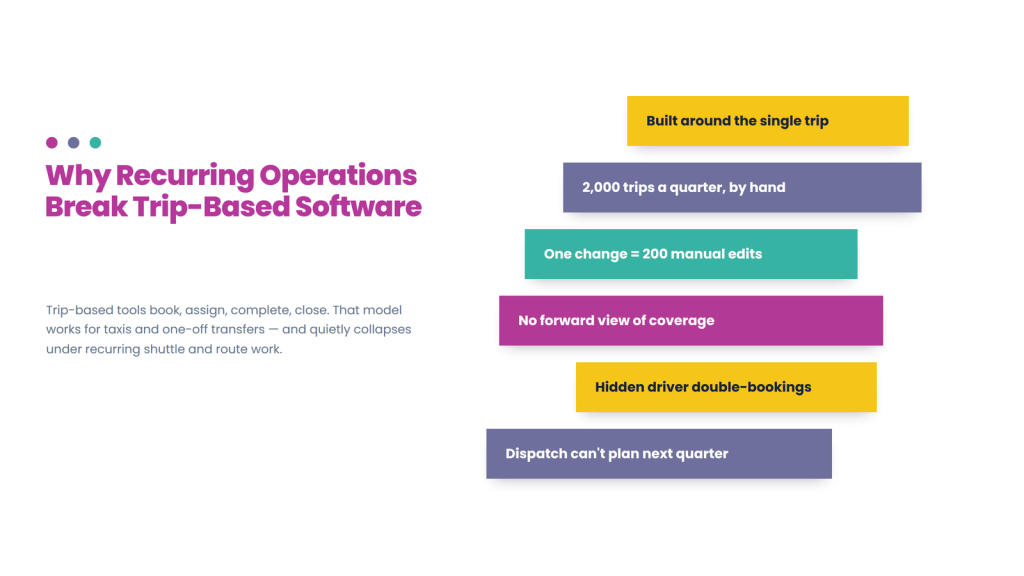
A corporate shuttle running four routes twice a day, five days a week, produces roughly 2,000 trips a quarter. Handled as individual bookings, that is 2,000 records to create, 2,000 driver assignments to make, and — when the client changes the afternoon departure by fifteen minutes — 200 records to edit by hand. Meanwhile someone has to know whether next Tuesday is actually covered, whether a driver is rostered onto two routes at once, and what happens over a public holiday.
That is the scheduling problem, and it is not solved by better dispatch. Dispatch answers “who takes this trip?” in the moment. Scheduling answers “does the next three months work, and can we staff it?” — a question that has to be answered in advance, repeatedly, as the plan changes.
This guide covers what automated scheduling software for transport should do for recurring shuttle and route operations, how scheduling differs from dispatch and routing, the exception cases that expose weak implementations, what it costs, and what to test. For the broader operational picture, see our shuttle software guide; this article goes deeper into the scheduling layer.
What is transportation scheduling software?
Transportation scheduling software plans transport work in advance — defining recurring trip patterns, generating the resulting schedule, matching drivers and vehicles to it, detecting conflicts, and managing changes across a series rather than trip by trip.
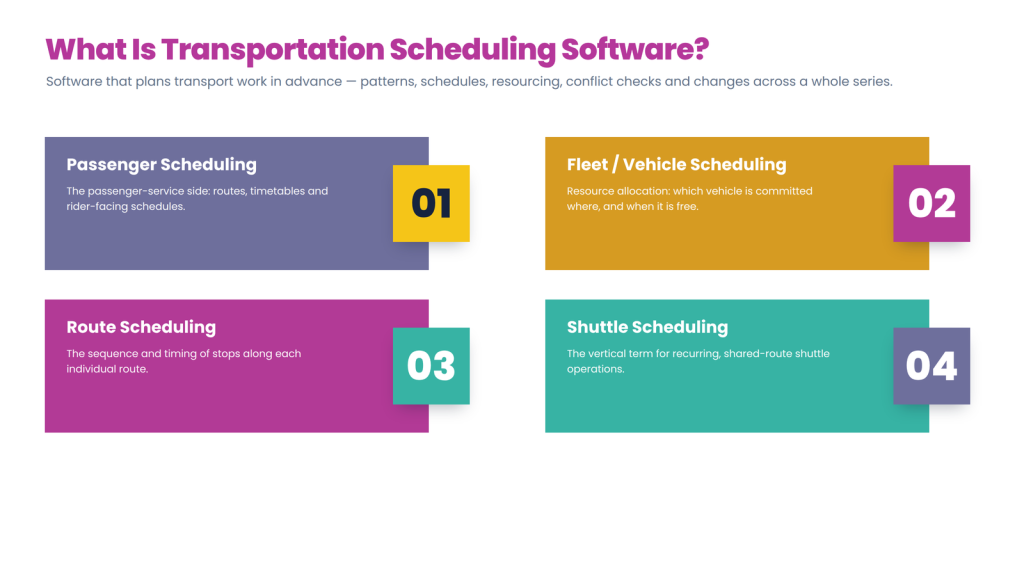
The category overlaps with several labels that emphasise different parts of the same job. Passenger transportation scheduling software focuses on the passenger-service side: routes, timetables and rider-facing schedules. Fleet scheduling software and vehicle scheduling software emphasise resource allocation — which vehicle is committed where, and when it is free. Route scheduling software focuses on the sequence and timing of stops along a route. Shuttle scheduling software is the vertical-specific term for recurring shared-route operations.
Most operators need elements of all four. The useful distinction is not the label but whether the system genuinely plans forward or simply stores future-dated trips.
Scheduling vs dispatch vs routing
These three are frequently confused in vendor marketing, and buying the wrong one is the most common mistake in recurring operations.
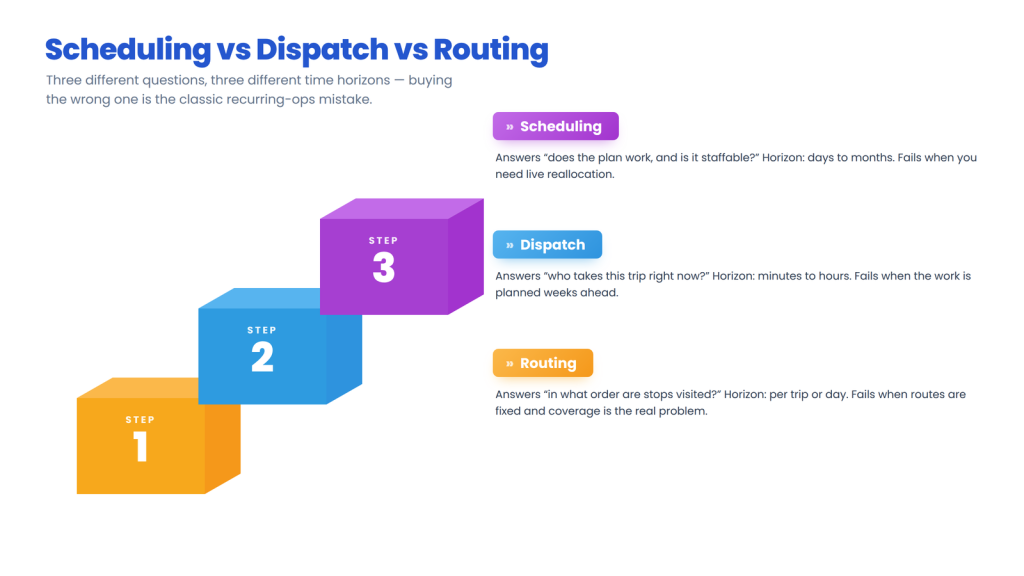
A platform strong on dispatch and weak on scheduling will handle your Monday morning well and leave you rebuilding next month’s roster in a spreadsheet. A routing tool will optimise the sequence of a route it is given but will not tell you that the driver assigned to it is already on another route. For recurring shuttle work, scheduling depth matters most — but you still need workable dispatch for the day itself.
What automated scheduling should do
Prioritise recurring trip series, roster-aware assignment, conflict detection, calendar and exception handling, capacity planning, and change propagation.
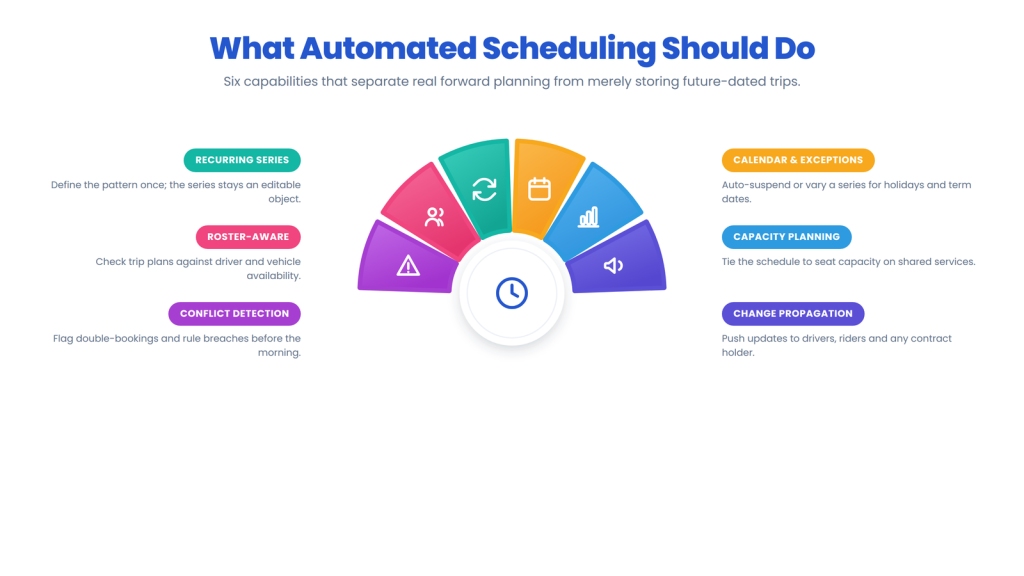
Recurring trip series. The system should let you define a pattern once — this route, these stops, these times, these days, this date range — and generate the schedule from it. Critically, the series should remain an editable object. If changing a departure time means editing 200 individual trips, the software is storing recurrence rather than managing it.
Roster-aware driver and vehicle assignment. Scheduling only works if trip plans and staff plans are checked against each other. The system should know driver availability, shift patterns, working-hour limits, qualifications and existing commitments, and should surface a clash when you assign someone already committed elsewhere. The same applies to vehicles: a bus committed to the 07:30 route is not available for the 07:45.
Conflict detection in advance. The single highest-value scheduling feature is being told about a problem before the morning it happens. Look for detection of double-booked drivers or vehicles, uncovered trips, shift-rule breaches, insufficient turnaround time between consecutive trips, and gaps created by leave or maintenance.
Calendar and exception handling. Real schedules are full of exceptions: public holidays, term dates, seasonal timetables, one-off event days, and client shutdown periods. The software should support calendars that suspend or vary a series automatically, rather than requiring someone to remember to cancel 40 trips before Christmas.
Capacity planning. For shared services, the schedule and the seat capacity interact — adding a departure or changing a vehicle changes how many riders you can carry. (Our seat allocation software guide covers the seating layer in depth.)
Change propagation. When a schedule changes, drivers, riders and any contract holder need to know. Confirm what updates automatically and what requires manual notification, because this is where “automated” scheduling often stops being automated.
The exception cases that expose weak scheduling
Any platform looks capable of creating a clean recurring series. These six scenarios separate real scheduling automation from stored future bookings.
1. Editing one instance versus the whole series. Next Tuesday’s 08:00 run needs to depart at 08:15, but only next Tuesday. Can you change one occurrence without detaching it from the series or editing every other trip? This is the most common daily scheduling task and the most common weak point.
2. Editing the series from a date forward. A client changes the afternoon departure permanently from the first of next month. Past trips must stay as they were, future ones must change. Systems that only support “edit all” or “edit one” force a manual rebuild.
3. Driver absence across a series. A driver rostered to a route for the next six weeks goes on leave for two. Can you reassign that block without touching the rest, and does the system flag which trips are now uncovered?
4. Vehicle substitution mid-series. A vehicle goes in for maintenance for a week. Its committed trips need reassigning, and if the replacement has different capacity, that has downstream effects on seat availability.
5. Holiday and term calendars. Can you apply a calendar that automatically suspends a series on defined dates, and vary a timetable seasonally, without recreating the schedule each term?
6. Overlapping series on shared resources. Two contracts both want the 07:00 slot with your only accessible vehicle. Does the system surface the conflict at planning time, or at 07:00?
Ask a vendor to demonstrate all six. Each takes two minutes and together they tell you more than an hour of feature presentation.
Driver rostering: the half operators underestimate
A trip schedule that no one is available to drive is not a schedule, so rostering and trip planning need to be planned against each other rather than in separate systems.
Useful rostering capability includes shift patterns and templates so a recurring roster is built once; availability and leave management; working-hour and rest-rule compliance where regulations apply; qualification matching so only appropriately licensed or trained drivers are assigned to particular services; cover and swap handling when someone is unavailable; and visibility for drivers of their own upcoming schedule.
Two practical checks. First, can a driver see their next fortnight in the driver app, and does it update when the roster changes? Drivers planning their lives around an unreliable roster is a retention problem as much as an operational one. Second, does the system prevent or merely flag a rule breach? Both are defensible, but you need to know which, especially where working-hour limits are legally enforced.
Where AI fits in transport scheduling
“AI scheduling” spans genuinely predictive systems and ordinary rule engines with a modern label, so the question to ask is what the system predicts, what it learns from, and whether a planner can override it.
Three applications are real in recurring transport operations:
- AI scheduling software — generating a workable schedule from constraints (routes, drivers, vehicles, shift rules, turnaround times) rather than requiring a planner to solve the puzzle manually. The value is in how well it handles competing constraints, not in whether it is called AI.
- AI driver scheduling — roster construction that balances workload, respects preferences and rules, and suggests cover when someone drops out. For operators with more than a handful of drivers, this is where most planning hours are actually spent.
- Predictive scheduling software — using historical ridership and performance data to suggest where a departure is under-used, where a route consistently runs late, or where capacity should shift between services.
Two questions cut through the marketing. What data does it learn from — your own operating history, or nothing at all? And can a planner override it and see why it made a decision? In scheduling, where a bad automated roster can breach a working-hour rule or leave a contract uncovered, explainability and override matter considerably more than autonomy.
Is there free fleet scheduling software?
Free and freemium scheduling tools exist, but for recurring transport operations they usually cap the things that matter: number of vehicles or drivers, recurring-series support, roster features, or integration.
Generic calendar and workforce-scheduling tools can genuinely work for a very small operation running two or three fixed routes — a shared calendar and a spreadsheet roster is a legitimate starting point. What they cannot do is check trip schedules against driver rosters, detect conflicts, propagate a mid-series change, or connect to dispatch and rider communication.
The honest test is when manual planning starts costing more than software would. For most operators that arrives somewhere between five and fifteen recurring routes, or when one person’s week is dominated by rebuilding the roster. Treat free tools as a genuine starting point rather than a permanent solution, and check what triggers a paywall before you depend on one.
What automated scheduling software costs
Scheduling functionality is often bundled into higher tiers or priced per driver, vehicle or route, and the lines that catch operators are roster features and change notifications.
| Cost line | What to confirm |
| Pricing basis | Per driver, vehicle, route, trip or flat |
| Tier gating | Whether recurring series and conflict detection need a higher plan |
| Rostering | Whether driver scheduling is included or a separate module |
| Setup | Route, timetable and shift-pattern configuration effort |
| Notifications | Per-message costs when a schedule change alerts drivers and riders |
| Integrations | HR and payroll systems for roster and hours data |
| Reporting | Whether schedule adherence and utilisation reports need a higher tier |
| Support | Cover during planning cycles, not just service hours |
Model the cost against the labour it replaces. Scheduling software makes a clearer business case than most transport tools precisely because the manual alternative has a measurable cost: if rebuilding rosters and schedules consumes ten hours a week, that number is your budget benchmark. (For a fuller breakdown, see our guide to transport software pricing models; insert verified vendor figures where you need published numbers.)
How to test scheduling software in a demo
Build a real recurring series, then change it — a demo that only creates a clean schedule tells you nothing.
Run these ten tests in any shuttle scheduling software demo or free trial:
- Create a recurring series for one of your actual routes across three months.
- Assign drivers and vehicles to it.
- Change one single occurrence without affecting the rest.
- Change the series from a date forward, leaving past trips intact.
- Mark a driver unavailable for two weeks mid-series and reassign cover.
- Substitute a vehicle with a different capacity.
- Apply a holiday calendar that suspends the series on set dates.
- Create a deliberate conflict — double-book a driver — and see whether it is caught at planning time.
- Show what a driver sees of their upcoming roster.
- Pull a schedule-adherence or utilisation report.
Then ask the commercial questions: which tier includes recurring series and conflict detection, whether rostering is a separate module, what notification costs apply when schedules change, and how schedules and rosters export if you leave. (Our dispatch software buyer checklist covers the wider framework.)
Common mistakes in buying scheduling software
- Buying dispatch software for a scheduling problem. It handles today well and next month badly.
- Accepting stored future trips as a recurring series. If you cannot edit the series as an object, it is not scheduling.
- Ignoring roster integration. A trip schedule unchecked against driver availability is a guess.
- Not testing mid-series edits. It is the most frequent daily task and the most common weak point.
- Overlooking calendars. Holidays and term dates will otherwise be handled manually forever.
- Forgetting change propagation. Automated scheduling that requires manual notification is half-automated.
- Assuming free tools scale. They work until conflicts and rosters matter, then stop abruptly.
- Skipping the driver’s view. Drivers who cannot see a reliable roster is a retention issue.
How AllRide Bus supports recurring transport operations
AllRide Bus is the shuttle, bus and scheduled group transport product in the AllRide Apps suite — an AI-powered, white-label platform used by leading transport businesses globally, covering employee and corporate shuttles, school and campus transport and scheduled route services, alongside AllRide Cab for taxi and transfer work.
The confirmed platform capabilities relevant here are multi-channel booking; automated dispatch and driver assignment with manual dispatcher control; real-time GPS tracking and route optimisation; configurable fares and service zones; payment gateway integration; branded rider and driver apps; and reporting dashboards — on a cloud platform with multi-language and multi-currency support, and several API integrations.
On the scheduling mechanics specifically, ask rather than assume. Recurring trip series and how they are edited, roster-aware conflict detection, holiday and term calendars, and driver shift management vary considerably by platform and configuration across this category — and they are exactly the capabilities this guide tells you to test. Raise them directly with us, including what is achievable through the platform’s integrations with workforce and HR systems, before shortlisting anyone, ourselves included. If recurring scheduling is your primary requirement, it should be the first thing you test on every platform rather than the last.
Talk through your recurring routes with the AllRide team — book a free demo.
Frequently asked questions
What is automated scheduling software for transport?
Automated scheduling software for transport builds and maintains recurring trip schedules: generating a trip series from a defined pattern, assigning drivers and vehicles against rosters, detecting conflicts before the service day, and handling exceptions such as holidays, absences and vehicle substitutions without rebuilding the whole schedule manually.
What is the difference between scheduling and dispatch software?
Dispatch answers “who takes this trip now?” over minutes and hours. Scheduling answers “what does the plan look like over the coming weeks, and can we staff it?” Recurring shuttle and route operations need scheduling depth; on-demand operations need dispatch depth. Many platforms do one well and describe themselves as doing both, so test the one that matters to you.
What is passenger transportation scheduling software?
Passenger transportation scheduling software plans recurring passenger services in advance — routes, timetables, trip series, and the drivers and vehicles assigned to them — as opposed to allocating individual trips on demand. It typically covers conflict detection, calendar exceptions and schedule changes across a series, which is what recurring shuttle, school and corporate transport require.
Can scheduling software handle recurring trips?
Good scheduling software treats a recurring trip as a series generated from a pattern, not as hundreds of copied bookings. The important test is whether you can edit one occurrence, edit the series from a date forward, and apply calendars that suspend it on set dates — all without rebuilding the schedule.
How does conflict detection work in fleet scheduling software?
The system checks planned trips against driver and vehicle commitments and flags problems in advance: double-booked drivers or vehicles, uncovered trips, shift-rule breaches, insufficient turnaround between consecutive trips, and gaps created by leave or maintenance. Detecting these at planning time rather than on the service morning is usually the highest-value scheduling feature.
Does scheduling software include driver rostering?
Some platforms include it, others treat it as a separate module or expect integration with a workforce system. It matters, because a trip schedule that has not been checked against driver availability, shift patterns and working-hour rules is only a plan on paper. Confirm whether rostering is included at your tier.
Is there free fleet scheduling software?
Free and freemium tools exist and can genuinely work for a very small operation running a few fixed routes. They typically cap vehicles or drivers and lack recurring-series management, conflict detection and roster integration. Treat them as a starting point, and move on when manual planning costs more than software would.
What does AI scheduling software actually do?
Usually one or more of: generating a workable schedule from competing constraints such as routes, drivers, vehicles and shift rules; constructing rosters that balance workload and suggest cover; or using historical data to predict under-used departures and routes that run late. Ask what data it learns from, and whether a planner can override it and see the reasoning.
How much does transportation scheduling software cost?
Typically a monthly subscription per driver, vehicle, route or trip, with recurring-series and conflict-detection features sometimes gated behind higher tiers. Also confirm whether rostering is a separate module, notification costs when schedules change, integrations, and reporting tiers. Benchmark the cost against the planning hours it replaces, which is usually the clearest business case.
What should I test in a scheduling software demo?
Build a real recurring series across three months, then break it: change one occurrence, change the series from a date forward, remove a driver mid-series, substitute a different-capacity vehicle, apply a holiday calendar, and create a deliberate double-booking to see whether it is caught at planning time. Those tests reveal far more than a standard product tour.
Conclusion
Recurring transport operations fail on planning, not on dispatch. The routes are known, the timetable is agreed, and the difficulty is keeping three months of trips, drivers and vehicles coherent while the plan changes weekly.
Automated scheduling software earns its cost when a recurring series is a real editable object, when conflicts surface before the service morning rather than during it, and when a mid-series change takes one action instead of two hundred. Test those three things on every platform you consider — starting by building one of your actual routes and then changing it. To talk through the scheduling requirements of your recurring services, book a free AllRide Bus demo.