


 Fleet Management
 Route optimization
 Shuttle Transportation
 Delivery Management
 School Bus Transportation
 Ride Sharing Management
 Airport Transfer Booking
  Vehicle inspection
 Car Rental Management
 Trucking & Logistics
 Food & Beverage
 E-Commerce
 Passenger Transit
 Delivery
 School & Corporate
Cab Dispatch Software for End-to-End Trip Management
Cab dispatch software manages a passenger trip from end to end — connecting booking channels, driver and vehicle assignment, live tracking, trip statuses, passenger communication, fare calculation, payments, feedback and reporting through one operational system, from the moment a booking is created until the trip is completed, paid for and recorded. When these stages are managed through separate calls, messages and spreadsheets, information is easily delayed or lost; a dispatch platform connects them through one trip-management workflow.
Key takeaways
- A cab trip begins before driver assignment and continues after the passenger is dropped off.
- The nearest driver is not always the right driver; availability, vehicle type, capacity and operating rules also matter.
- A complete workflow should manage driver acceptance, timeouts, cancellations, no-shows and reassignment.
- Scheduled and on-demand trips require different dispatch logic.
- Automation should handle repeatable decisions while dispatchers retain control over exceptions.
- Trip data should flow into payments, feedback, reporting and future operational planning.
A passenger trip looks simple from the outside: someone requests a cab, a driver arrives, and the passenger reaches the destination. Behind that journey is a chain of operational decisions. The booking must contain the right information. A suitable driver and vehicle must be available. The trip must be offered, accepted and monitored. Delays, cancellations and route changes need to be handled. The fare must be calculated, the payment recorded, and the completed trip added to operational reporting.
What is end-to-end cab trip management?
End-to-end trip management connects every event associated with a passenger ride across three phases — before, during, and after the trip — sharing one trip record throughout. A dispatch system is only truly end to end when these stages share the same record.
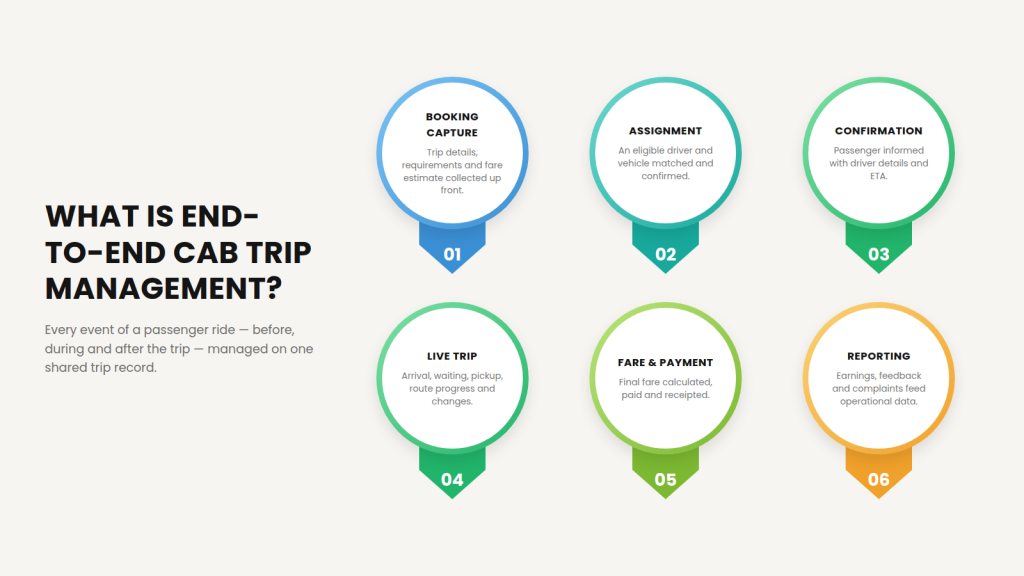
Before the trip: booking capture, passenger and trip requirements, fare estimate, driver and vehicle eligibility, trip assignment, confirmation and ETA communication.
During the trip: driver arrival, passenger pickup, waiting time, trip start, route progress, stops and changes, safety or service exceptions.
After the trip: trip completion, final fare, payment, receipt, driver earnings data, passenger feedback, complaint handling, operational reporting.
If the dispatcher needs one application for bookings, another for driver communication, a spreadsheet for fares and a separate report for completed work, the operation is still fragmented.
What systems are involved in managing a cab trip?
End-to-end trip management is usually delivered through several connected interfaces — a passenger booking channel, a dispatcher panel, a driver app, a customer tracking view, a fare and payment system, and a reporting dashboard — all sharing one trip record.
| System component | Main user | Purpose |
| Booking form or passenger app | Passenger | Create and manage ride requests |
| Dispatcher panel | Dispatcher or administrator | Review bookings, assign trips and monitor operations |
| Driver application | Driver | Receive assignments, navigate and update trip status |
| Customer tracking interface | Passenger | View driver, vehicle, ETA and trip progress |
| Fare and payment system | Passenger and operator | Calculate fares and process transactions |
| Reporting dashboard | Manager or administrator | Analyse trips, utilisation, revenue and exceptions |
AllRide’s public product pages describe a connected customer module, driver module and administrative dispatch panel, supported by booking, driver management, vehicle management, automated assignment, real-time tracking, route optimisation and reporting.
Passenger booking channels
A passenger may book through a mobile application, a web booking form, a dispatcher-assisted phone call, a hotel or corporate account, or another integrated booking source. Every booking should enter the same central queue — this prevents app bookings from being handled differently from phone bookings and gives dispatchers one view of active, upcoming and unassigned trips.
Dispatch panel
The dispatch panel is the operational control centre. It should allow authorised users to create and edit bookings, see driver and vehicle availability, assign or reassign trips, monitor active rides, handle cancellations, adjust trip details, communicate changes, and review completed work.
Driver application
The driver app connects the office plan with field execution. The driver should receive pickup and drop-off details, scheduled pickup time, passenger requirements, vehicle or service information, navigation, contact options, and clear trip-status controls.
Customer interface
The customer experience should provide the information the passenger needs without requiring repeated phone calls — booking confirmation, assigned driver, vehicle details, live arrival status, estimated pickup time, trip progress, fare information, and payment confirmation.
Fare and payment system
Fare management should apply the operator’s configured pricing rules consistently. Depending on the business, the fare may consider base price, distance, time, waiting, zone, vehicle class, scheduled service, extra stops, tolls, add-ons, discounts, and cancellation rules.
Reporting and administration
Every completed or cancelled trip should contribute to a usable operational record. Managers may need to see booking volume, completed trips, unassigned requests, cancellations, pickup performance, driver utilisation, revenue, payment status, and customer feedback.
How does cab dispatch software manage a trip?
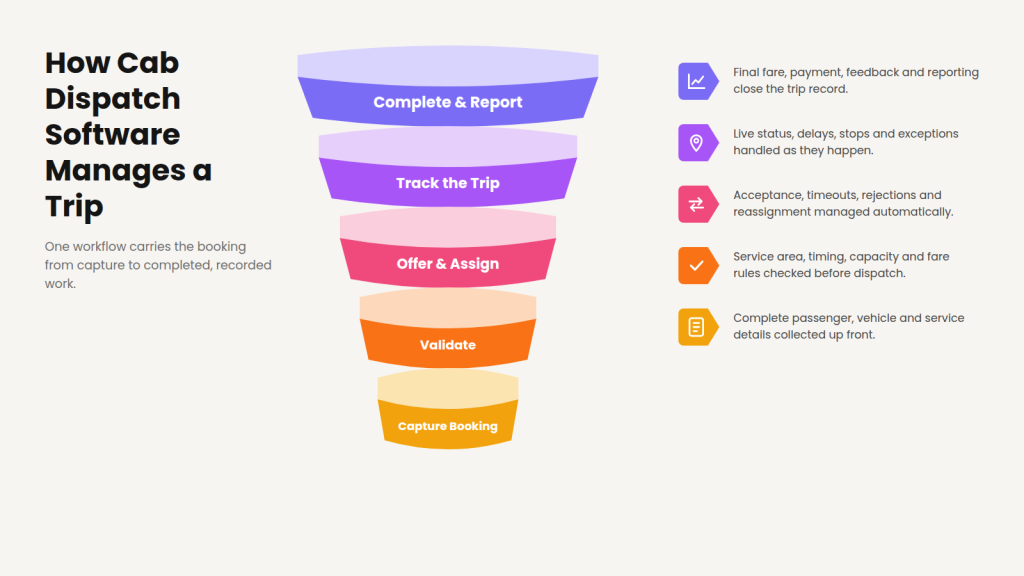
1. Capture the booking
The workflow begins when a passenger or dispatcher creates a booking. At minimum, it should capture pickup location, destination, requested date and time, passenger name, contact information, service type, vehicle requirement, payment method, and relevant passenger instructions. Depending on the service, it may also need passenger count, luggage, wheelchair or accessibility requirements, flight information, multiple stops, child-seat requests, a return journey, or corporate account details.
Why complete booking data matters. Missing information causes problems later — a vehicle may arrive without enough luggage space, the wrong vehicle class may be assigned, a driver may not know there are several stops, or an airport pickup may be scheduled without flight details. The booking form should collect the information needed to dispatch the trip, not merely a pickup and destination.
2. Validate the trip requirements
Before assignment, the system or dispatcher should check whether the trip is operationally valid: Is the pickup inside the service area? Is the selected service available at that time? Is the booking inside the permitted advance-booking window? Is an eligible vehicle type available? Does the vehicle have enough passenger and luggage capacity? Is the fare rule configured? Is the payment method supported? Does the customer account have restrictions? Are required passenger details present?
A booking should not move automatically into assignment when a critical requirement is missing. Instead, it should be held for review, returned for correction, or presented to the dispatcher with an alert.
3. Identify eligible drivers and vehicles
The closest vehicle is not always the correct vehicle. Before evaluating distance, the system should create an eligible pool.
Driver eligibility may depend on online or duty status, current availability, active shift, approved documents, vehicle assignment, service eligibility, operating zone, and existing trip commitments. Vehicle eligibility may depend on vehicle type, passenger capacity, luggage capacity, accessibility, active status, document validity, service area, and maintenance availability.
Only after these checks should the system compare eligible drivers using distance from pickup, estimated arrival time, current workload, rotation, assignment priority, or another configured rule.
Eligibility versus optimisation. Eligibility answers “who is allowed and able to perform the trip?” Optimisation answers “which eligible driver is the most suitable?” Keeping these stages separate prevents a nearby but unsuitable driver from receiving the booking.
4. Offer or assign the trip
Cab operators use different assignment methods.
Direct assignment — a dispatcher selects a specific driver and sends the trip directly, useful for VIP bookings, specialised vehicles, known passenger requirements, contract work, or exception handling.
Sequential offer — the system sends the trip to one eligible driver; if they reject or fail to respond, the offer moves to the next candidate, giving each driver a defined response window.
Broadcast offer — the trip is offered to several eligible drivers and assigned according to the configured acceptance rule. This can speed up allocation, but confirm how the platform prevents confusion or unfair allocation.
Automatic assignment — the system selects and assigns the driver according to configured business rules. AllRide’s Cab pages describe automated driver assignment based on proximity and availability, with manual dispatch and trip-management functions available through the web dispatch panel.
What should happen after an offer? The workflow needs clearly defined statuses. The primary path runs: Unassigned → Offered → Accepted → Driver en route. Alternative outcomes include:
- Offered → Rejected → Offer next driver
- Offered → Timed out → Offer next driver
- Accepted → Driver cancels → Reassign
- No eligible driver → Dispatcher review
Without these states, dispatchers may not know whether a trip is actually covered.
5. Manage pre-pickup communication
Once the trip is accepted, both the passenger and dispatcher need visibility.
The passenger may receive booking confirmation, driver name, vehicle details, pickup estimate, driver arrival notification, and updates if the assignment changes. The dispatcher should see driver location, estimated arrival, current trip status, potential delay, and any passenger or driver communication. The driver should see complete pickup instructions, passenger contact options, scheduled time, waiting rules, destination, and service notes.
Pre-pickup communication is especially important for airport transfers, hotel collections, corporate travellers, large venues, and pickups with restricted access. The software should provide enough information to complete the pickup while protecting unnecessary personal data.
6. Verify pickup and waiting time
Driver arrival does not always mean the passenger has boarded. The workflow should distinguish between driver en route, driver arrived, waiting, passenger onboard, and trip started.
Driver-arrival process. When the driver reaches the pickup point, the system may record the arrival time, notify the passenger, start the configured free-waiting period, allow the driver to contact the passenger, and escalate the booking if the passenger cannot be located.
Pickup verification. Depending on the service, pickup may be confirmed through driver confirmation, passenger confirmation, an OTP, a QR code, the passenger name, or another controlled process.
Passenger no-show. A clear process should define how long the driver waits, whether the driver must attempt contact, when the dispatcher is informed, what evidence is recorded, whether a fee applies, and how the trip is closed.
Driver no-show. The platform should also handle situations where the assigned driver does not begin travelling, becomes unavailable, misses the scheduled time, or cannot locate the pickup — notifying the dispatcher early enough to reassign.
7. Monitor the active trip
After pickup, the trip moves from pre-service dispatch into active execution. The driver app should make it easy to start the trip, navigate to the destination, view scheduled stops, update trip status, communicate with the dispatcher, and complete the ride.
The dispatcher may need to monitor current location, route progress, ETA, trip duration, stops completed, unexpected delay, and route deviation. Real-time tracking should support action, not merely display a vehicle on a map — helping the dispatcher answer questions like: Is the vehicle moving toward the destination? Will the driver be late for the next booking? Has the passenger requested a route change? Does another trip need reassignment? Is the driver stopped unexpectedly? AllRide describes real-time fleet and driver tracking, trip monitoring and route optimisation as part of the Cab platform.
8. Handle changes and exceptions
No dispatch operation runs entirely according to plan. A complete system should help the team respond consistently.
| Exception | Recommended system response | Human decision |
| Driver rejects trip | Return trip to assignment queue | Review repeated rejection pattern |
| Driver does not respond | Expire offer and move to next driver | Adjust offer timeout if necessary |
| No eligible driver | Alert dispatcher | Decide whether to delay or decline |
| Driver cancels | Reopen and prioritise trip | Contact passenger if pickup is affected |
| Passenger cancels | Apply cancellation rule | Review disputed fee |
| Passenger no-show | Record wait and contact attempts | Approve trip closure |
| Driver running late | Update ETA and alert dispatcher | Reassign if required |
| Vehicle problem | Mark vehicle unavailable | Assign replacement |
| Pickup location changes | Recalculate route and timing | Approve major fare change |
| Extra stop added | Update trip and fare | Confirm service policy |
| Payment fails | Keep payment pending or request another method | Resolve disputed charge |
| Safety incident | Trigger emergency procedure | Follow operator escalation plan |
| Poor connectivity | Store status locally where supported | Confirm missing events later |
Automation should manage repeatable responses, but the dispatcher should remain able to override assignments, contact participants, change the vehicle, adjust the schedule, approve exceptions, and document the final outcome.
Why exception records matter. The operator should be able to analyse how many trips required reassignment, why drivers rejected work, which pickup locations caused delays, how often passengers did not appear, and which payment methods failed. That turns day-to-day problems into information for future improvement.
9. Complete the fare and payment
When the ride ends, the system should confirm destination, completion time, final distance or duration, waiting time, additional stops, tolls or add-ons, discounts, and relevant fare adjustments. The final fare should follow the operator’s configured rules.
Payment outcomes. A trip may be paid online, paid in cash, charged to a corporate account, paid from a wallet, marked for invoicing, or left pending after a failed transaction. The payment status should be linked to the trip rather than recorded in an unrelated spreadsheet.
Fare adjustments. Not every fare change should happen without control. The operator may require approval when a large discount is added, an extra fee is removed, a driver enters an unusual waiting time, the destination changes substantially, or a refund is requested. Role-based permissions and an adjustment history help reduce unauthorised changes.
10. Close the trip and update reporting
A trip is not operationally complete merely because the vehicle reached the destination. Closure may include final trip status, payment status, receipt, driver earnings record, passenger rating, driver rating, complaint or feedback, lost-property report, and trip data for reporting.
Post-trip reporting. Completed-trip data should help answer: How many bookings were received? How many were assigned? How many were completed? How many were cancelled? Which trips were late? How much time was spent waiting? How many drivers rejected trips? How many payment failures occurred? Which vehicle types were most requested? Which booking channels generated the most completed rides?
On-demand vs scheduled trip management
On-demand and scheduled trips should not follow identical dispatch logic — on-demand prioritises fast live allocation, while scheduled prioritises future capacity planning and punctual arrival.
| Area | On-demand trip | Scheduled trip |
| Booking time | Immediate | Booked in advance |
| Assignment priority | Fast response | On-time preparation |
| Driver selection | Current live availability | Future shift and schedule |
| Vehicle planning | Based on current fleet | Reserved or planned capacity |
| Passenger expectation | Fast pickup | Punctual scheduled arrival |
| Assignment timing | Usually immediate | May be pre-assigned |
| Main risk | Long wait or no available driver | Late arrival or scheduling conflict |
| Dispatcher focus | Live allocation | Future capacity planning |
| Typical use cases | Local taxi and ride-hailing | Airport, corporate and medical trips |
On-demand workflow requires immediate eligibility checks, rapid assignment, current driver position, live ETA, and quick reassignment if the first driver declines. Scheduled workflow requires advance capacity planning, driver-shift validation, conflict detection, pre-assignment rules, reminder notifications, and monitoring before the pickup time. A platform that performs well for instant rides may still fail scheduled airport or corporate operations if it cannot reserve capacity and identify future conflicts.
What features should end-to-end cab trip software have?
| Capability | Why it matters |
| Multi-channel booking | Keeps app, web and phone bookings together |
| Complete booking fields | Prevents missing passenger or service information |
| Booking validation | Stops incomplete trips from entering dispatch |
| Driver eligibility rules | Prevents unsuitable driver assignments |
| Vehicle eligibility rules | Matches capacity and service requirements |
| Manual and automated dispatch | Balances speed with dispatcher control |
| Offer timeout and reassignment | Prevents trips remaining unconfirmed |
| Scheduled-trip management | Supports future bookings |
| Driver application | Connects assignment with execution |
| Passenger notifications | Keeps customers informed |
| Live tracking | Supports ETA and exception handling |
| Pickup verification | Confirms the correct trip has started |
| Waiting and no-show controls | Standardises disputed situations |
| Multi-stop management | Handles more complex journeys |
| Fare configuration | Applies pricing consistently |
| Payment integration | Connects transaction status with the trip |
| Role-based access | Protects sensitive controls |
| Audit trail | Records key changes and decisions |
| Feedback and complaints | Connects service quality to the trip |
| Reports and analytics | Supports operational improvement |
| APIs and integrations | Prevents disconnected systems |
| Data export | Supports reporting and migration |
Which trip-management KPIs should operators track?
Booking KPIs: booking volume, booking-channel mix, booking completion rate, unassigned bookings, cancelled bookings.
Dispatch KPIs: time from booking to assignment, driver acceptance rate, offer timeout rate, reassignment rate, number of manual overrides.
Pickup KPIs: estimated versus actual arrival, average passenger wait, driver late-arrival rate, passenger no-show rate, driver no-show rate.
Trip KPIs: on-time completion, average trip duration, route deviation, waiting time, active versus idle time.
Financial KPIs: average fare, revenue per trip, failed-payment rate, refund rate, revenue per active vehicle.
Service KPIs: passenger rating, complaint rate, repeat-booking rate, driver rating, support contacts per trip.
Do not track every available number simply because the dashboard provides it. Select metrics that correspond to a decision or improvement process.
How AllRide supports the cab trip lifecycle
AllRide Cab connects the main operational areas involved in passenger-trip management. Its public pages describe customer and web booking, a central web dispatch panel, driver and vehicle management, trip management, manual and automated driver assignment, real-time trip tracking, route optimisation, fare calculation, customer notifications, role-based access, reporting, and customer and driver applications.
This structure allows bookings, dispatch decisions and field execution to remain connected instead of being managed through separate tools. AllRide can be particularly relevant to operators managing combinations of on-demand taxi trips, scheduled bookings, airport and hotel transfers, private transportation, corporate rides, and branded passenger and driver experiences.
The exact assignment rules, integrations, pricing configuration and custom workflows should be verified against the operator’s requirements and selected package. (For the wider picture, see our taxi dispatch software guide.)
Want to test your complete trip workflow? Bring your booking rules, vehicle types, driver policies, scheduled rides and exception scenarios to an AllRide demonstration. Book a 20-minute demo.
Frequently asked questions
What is cab trip-management software?
Cab trip-management software connects all stages of a passenger ride, including booking, driver and vehicle assignment, tracking, pickup, completion, fare calculation, payment and reporting, through one operational system.
Is cab dispatch software the same as fleet-management software?
Not exactly. Cab dispatch software focuses on passenger bookings, assignments and trip execution. Fleet-management software may focus more heavily on vehicle maintenance, fuel, telematics, compliance and asset performance. Some platforms combine both areas.
Can cab dispatch software manage phone bookings?
Yes. A suitable dispatcher panel should allow staff to enter phone bookings into the same system used for app and web bookings.
How does automatic driver assignment work?
The system evaluates eligible drivers using configured information such as availability, location, vehicle type, capacity, shift and assignment rules. The exact logic differs between platforms.
Does automatic dispatch replace the dispatcher?
No. It should automate routine assignments while allowing the dispatcher to supervise operations, override decisions and manage exceptions.
Can the system handle scheduled trips?
A suitable system can manage advance bookings, future driver availability, pre-assignment and reminders. Buyers should test scheduling conflicts during the demo.
What happens if a driver rejects a trip?
The trip should return to an assignment process according to the operator’s rules. It may be offered to another driver, reassigned manually or escalated to the dispatcher.
Can dispatch software handle passenger no-shows?
It should support arrival time, waiting periods, contact attempts, no-show status and the operator’s applicable fee or closure procedure.
Does cab dispatch software process payments?
Many platforms connect fare calculation with payment gateways, cash payments, wallets or corporate accounts. The exact payment methods and regional availability should be verified.
What is the most important feature to test?
Test the complete exception workflow. Basic booking and assignment are easy to demonstrate; cancellations, driver rejection, no-shows, schedule conflicts and payment failures reveal how well the platform works in real operations.