


 Fleet Management
 Route optimization
 Shuttle Transportation
 Delivery Management
 School Bus Transportation
 Ride Sharing Management
 Airport Transfer Booking
  Vehicle inspection
 Car Rental Management
 Trucking & Logistics
 Food & Beverage
 E-Commerce
 Passenger Transit
 Delivery
 School & Corporate
What to Look for in Dispatch Software: A 15-Point Fleet Buyer Checklist
What to look for in dispatch software comes down to fifteen points across four areas: how well it fits your booking model, the strength of its core dispatch and driver features, how it fits your wider operation, and the quality of the vendor as a long-term partner. The best dispatch software isn’t the one with the longest feature list — it’s the one that scores well on the points that actually matter to your fleet. Use this checklist to evaluate every platform on the same terms.
Key takeaways
- Start with your own needs before comparing any vendor’s features.
- Core dispatch logic and the driver app matter more than feature count.
- Total cost at your volume, not the headline rate, is the real price.
- The vendor is a long-term partner — evaluate support and exit terms.
- Score every platform on the same 15 points to compare fairly.
Why you need a checklist, not a feature list
Every dispatch vendor will show you a compelling demo and a long list of features. The problem is that feature lists are easy to match and hard to compare — two products can both claim “automated dispatch” and behave completely differently in practice. A structured checklist fixes that by forcing every platform through the same questions, in the same order, against your actual operation.
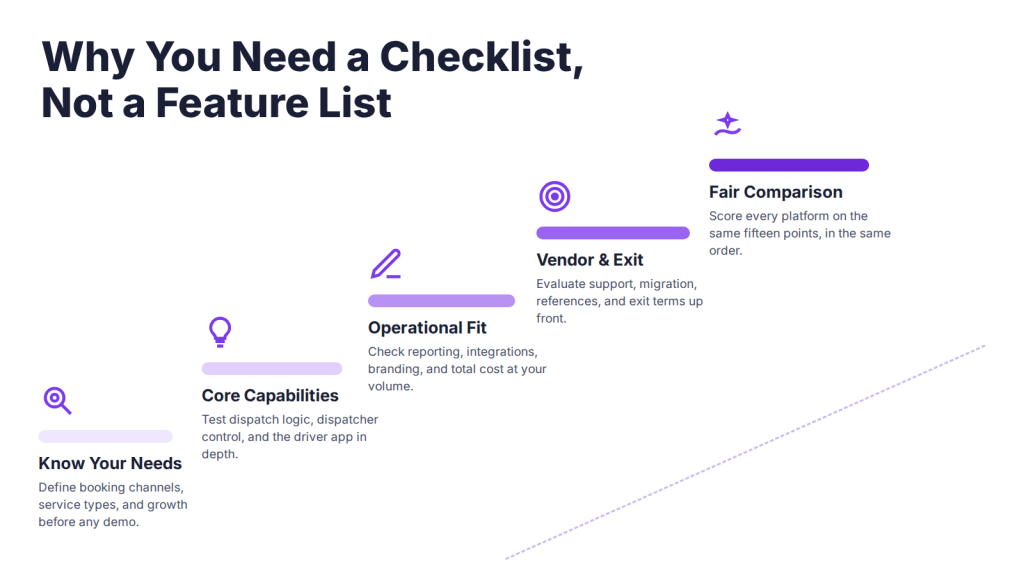
This is a full-journey checklist. It starts before you talk to any vendor (what does your fleet actually need?), moves through the core capabilities, then the operational fit, and finishes with the vendor relationship and the switch itself. Work through all fifteen points for each shortlisted platform and you’ll have a genuine dispatch software comparison rather than a collection of sales impressions.
For deeper detail on any stage, two companion guides go further: the fleet dispatch software features to compare covers the core capabilities in depth, and the taxi dispatch software demo checklist covers what to test live in the demo.
Part 1: Know your needs
Before evaluating any product, define your own requirements — the most common buying mistake is shopping for features before understanding your own operation.
1. Your booking channels. Map how customers actually book — phone, app, web, corporate accounts, scheduled reservations — and confirm the software handles all of yours in one system, not just the trendy ones.
2. Your service types. On-demand taxi, airport transfers, chauffeur, shuttle, and delivery all need different workflows. List every service you run so you don’t buy a platform that handles only one.
3. Your growth horizon. Evaluate for the fleet you expect in two to three years, not just today’s. Switching later is expensive, so buy for where you’re going.
Part 2: Core dispatch and driver capabilities
The core of any dispatch platform is how it assigns trips, what dispatchers can control, and whether drivers will actually use it.
4. Configurable assignment logic. Check how much control you have over how trips are assigned — nearest driver, rotation, vehicle type, priority rules — and how much you can change yourself versus needing the vendor’s developers. Rigid logic is the fastest way to outgrow a system.
5. Dispatcher control. The dispatcher dashboard should let you reassign, reroute, and contact drivers mid-trip, not just watch a map. A view-only screen is a monitor, not a dispatch tool.
6. Driver app quality. The driver app decides whether the whole system succeeds. Check clarity of assignments, navigation, one-tap status updates, earnings visibility, and offline resilience. If drivers need workarounds, adoption fails.
7. Multi-channel booking. App, web, and phone bookings should all land in one system. If phone bookings live separately, you keep the chaos you’re trying to escape.
8. Real-time tracking and ETA accuracy. Live tracking is table stakes; accurate ETAs are not. Ask how ETAs are calculated and whether route optimisation keeps them honest.
9. Scheduling depth. If you run recurring or contract work, confirm the software handles shifts, recurring routes, and driver scheduling alongside live dispatch. Dispatch-only tools can’t plan a roster.
Part 3: Operational fit
A dispatch platform has to fit the systems, brand, budget, and security requirements of your wider business.
10. Reporting and analytics. Pull the reports you’ll actually use weekly — revenue, driver performance, utilisation, cancellations. Thin or rigid reporting means you’ll export to spreadsheets anyway.
11. Integrations. Confirm it connects to what you already run — payments, maps, accounting, CRM — via available APIs and existing connectors. Integration gaps are a top reason operators replace software within two years.
12. White-label and app ownership. If your brand matters, check what’s brandable and — critically — whose developer accounts the customer and driver apps are published under. Vendor-owned app listings are a trap discovered too late.
13. Pricing and total cost. Look past the headline rate at total cost at your volume: subscription basis, setup, branded app fees, per-trip charges, payment and map usage, and support tier. A cheap per-trip plan can cost more than a flat one at scale. (See our guide to transport software pricing models for the full breakdown.)
Part 4: The vendor and the switch
The vendor becomes an operational dependency, so evaluate the relationship and the exit with the same rigor as the product.
14. Support and reliability. Confirm support hours, channels, response times, and whether live-operations support is included or a paid tier. Ask about uptime, redundancy, and what happens during an outage — dispatch fails at inconvenient moments.
15. Migration, references, and exit. Confirm they’ll migrate your customer, vehicle, driver, and booking data; ask for references from operators of your size and service type; and settle what happens to your data and branded apps if you leave. A vendor who answers these clearly is showing you how the partnership will run.
The 15-point checklist at a glance
| # | What to look for | What to verify |
| 1 | Booking channels | All your channels feed one system |
| 2 | Service types | Handles every service you run |
| 3 | Growth horizon | Scales to your 2–3 year fleet |
| 4 | Assignment logic | Configurable by you, not just the vendor |
| 5 | Dispatcher control | Reassign and intervene mid-trip |
| 6 | Driver app | Drivers adopt it without workarounds |
| 7 | Multi-channel booking | Phone, app, web in one place |
| 8 | Tracking + ETAs | Accurate, not just a live map |
| 9 | Scheduling | Handles shifts and recurring work |
| 10 | Reporting | The reports you actually use |
| 11 | Integrations | Connects to your existing stack |
| 12 | White-label | You own the app-store listings |
| 13 | Pricing | Total cost at your real volume |
| 14 | Support + uptime | Live-ops cover and outage handling |
| 15 | Migration + exit | Data and app ownership on exit |
How much should dispatch software cost?
Dispatch software is usually priced per driver, vehicle, or trip on a monthly subscription, or via custom white-label pricing, with enterprise deployments often quote-based. The headline figure rarely reflects the real cost.
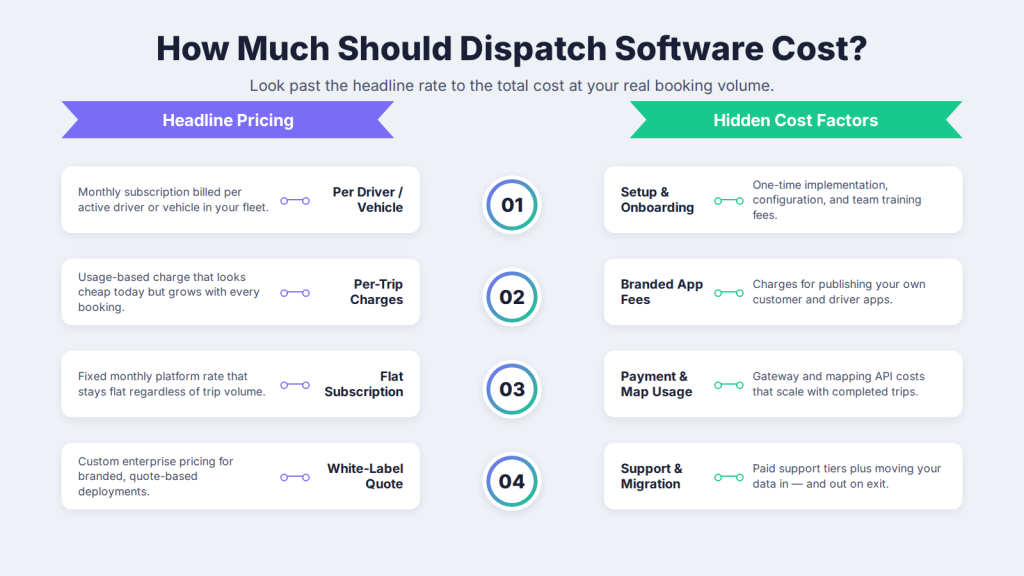
When comparing taxi dispatch software pricing, factor in setup and onboarding, branded app fees, per-trip or usage charges, payment and map costs, support tier, and migration. Model the total at your current volume and at double it, since per-trip pricing that looks cheap today can become your biggest line item as bookings grow. The right question isn’t “what’s the cheapest?” but “what will this cost to operate at our volume, and what does it replace?”
How to use this checklist in a demo
Take the 15 points into every vendor demo and make the platform prove each one against your operation, rather than watching a scripted tour. A demo you drive tells you far more than one you watch.
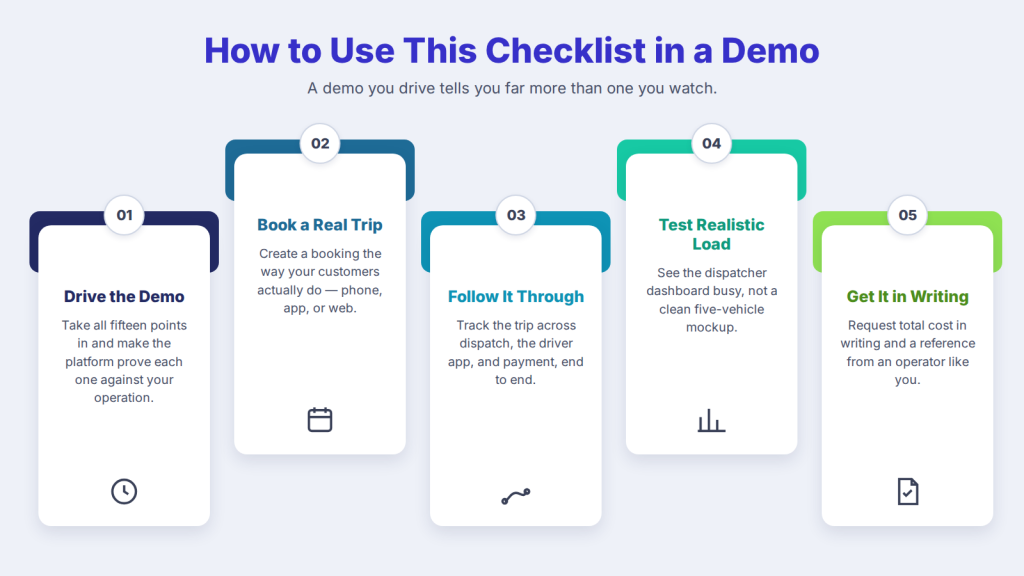
Book a trip the way your customers actually do, and follow it through dispatch, the driver app, and payment. Ask to see the dispatcher dashboard under realistic load, not a clean five-vehicle mockup. Request total cost in writing and a reference from an operator like you. For a demo-specific test plan, our taxi dispatch software demo checklist breaks down exactly what to test live, and if you’re still building a shortlist, the transportation reservation software alternatives guide helps you choose which platforms to demo.
How AllRide Cab measures against the checklist
AllRide Cab is the taxi and ride-hailing product in the AllRide Apps suite — an AI-powered, white-label platform built and maintained by Innofied Solutions and used by 300+ transport businesses globally.
Rather than take the feature list on trust, run the 15 points against it directly. On the core capabilities, that means automated dispatch with configurable driver and vehicle assignment; real-time GPS tracking with route optimisation behind ETAs; a dedicated driver app with assignments, navigation, and two-way ratings; multi-channel booking with payment gateway integration; and reporting dashboards. On operational fit, it’s a cloud-based, white-label platform with 100+ API integrations and 50+ language and multi-currency support, with branded customer and driver apps. On the partner side, post-launch maintenance and upgrades are handled by Innofied — worth testing against points 14 and 15.
The honest position: don’t take our word for any point on the checklist. Bring all fifteen to the demo and make the platform prove them against your fleet.
Run the checklist against AllRide Cab — book a free demo.
Frequently asked questions
What should I look for in dispatch software?
Look for fifteen things across four areas: fit with your booking channels, service types, and growth plans; core capabilities including configurable dispatch, dispatcher control, a strong driver app, multi-channel booking, accurate tracking, and scheduling; operational fit including reporting, integrations, white-label branding, and total cost; and the vendor relationship, including support, migration, references, and exit terms. Score every platform on the same points.
How do I choose the best dispatch software?
The best dispatch software is the one that scores well on your specific requirements, not the one with the most features. Define your needs first, then evaluate each shortlisted platform on the same checklist — dispatch logic, driver app, integrations, pricing, support, and migration — and verify the top options in a demo run on your own workflow before deciding.
What are the key features of taxi dispatch software?
Key features include automated dispatch and driver assignment, a dispatcher dashboard, a driver app, multi-channel booking, real-time GPS tracking, route optimisation, fare and payment handling, reporting and analytics, role-based access, and white-label branding. Which matter most depends on your operation, so evaluate features against your booking model rather than by count.
How much does dispatch software cost?
Dispatch software is usually priced per driver, vehicle, or trip on a monthly subscription, or via custom white-label pricing, with enterprise deployments often quote-based. Total cost also includes setup, branded app fees, payment and map usage, support tier, and migration. Compare the operating total at your real volume rather than the headline rate.
What’s the difference between fleet and transportation dispatch software?
The terms largely overlap — fleet dispatch software, transportation dispatch software, and dispatch management software all describe systems that assign trips to drivers and vehicles and coordinate operations. Some tools lean toward one transport type or add fleet-management features like vehicle records and reporting, so evaluate by capability against your needs rather than by the label.
Should I ask for a demo or free trial before buying?
Yes. Always evaluate dispatch software in a demo or free trial using your own workflow, not a generic tour. Create a real booking, dispatch it, follow it in the driver app, take payment, and test peak-load and failure scenarios. Involve a dispatcher and a driver, since they surface issues a sales walkthrough won’t.
Conclusion
Choosing dispatch software isn’t about finding the platform with the most features — it’s about finding the one that fits how your fleet actually works, at a cost that makes sense, from a vendor you can rely on. The fifteen points above turn a confusing set of demos into a fair, like-for-like comparison, and they work whether you run five vehicles or five hundred.
Take the checklist into every vendor conversation and let it, not the sales pitch, drive your decision. When you’re ready to test a platform against all fifteen points, book a free AllRide Cab demo and run it against your own operation.